// Practice lab
CCNA lab 8: DHCP, DHCP relay and PAT
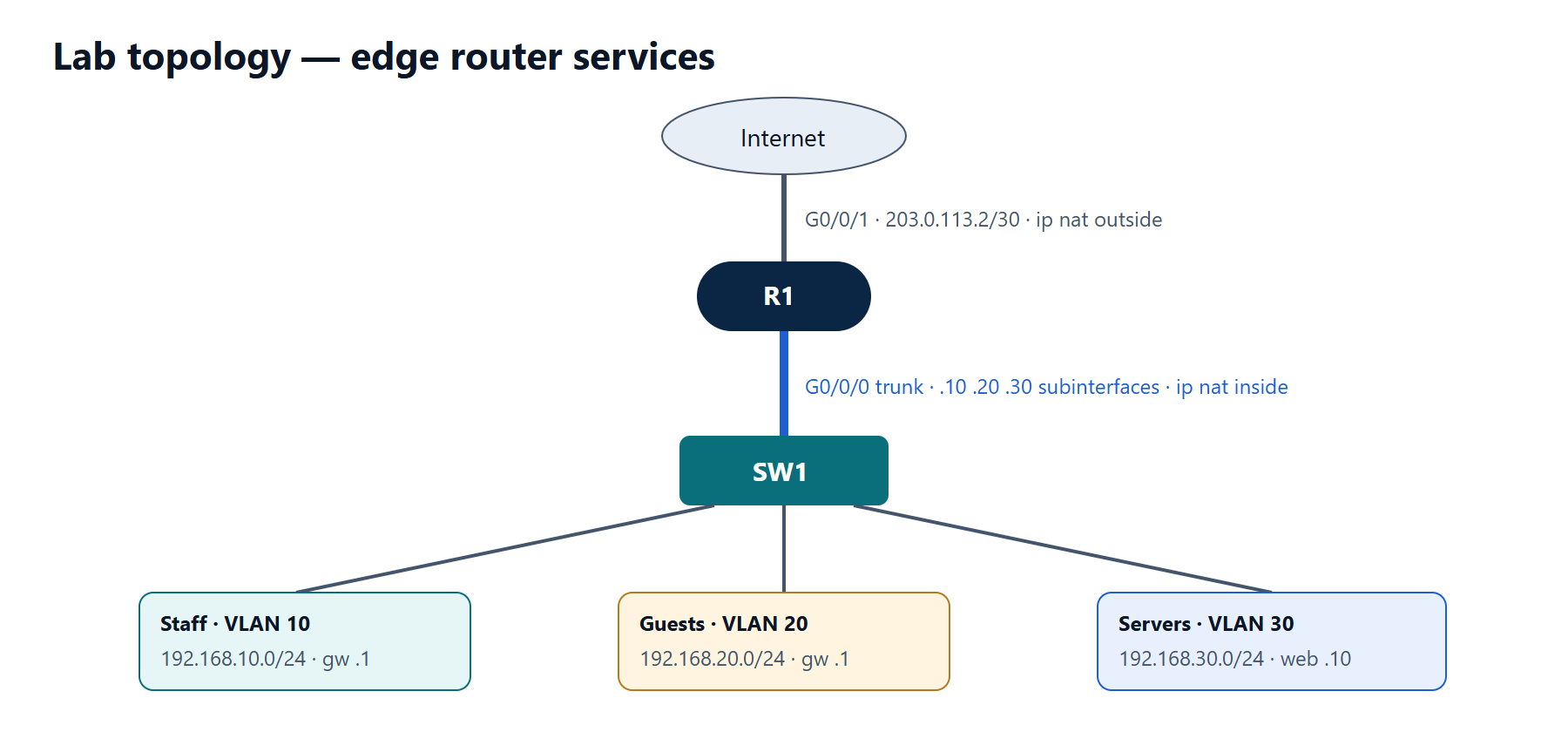
Make R1 the DHCP server for staff, relay guest requests to a server, translate all inside traffic with PAT and publish a web server with static NAT.
1 min read#ccna#dhcp#nat#lab
Objectives
- Configure router-on-a-stick for three VLANs.
- Run a DHCP pool for VLAN 10 on R1, excluding reserved addresses.
- Relay VLAN 20 DHCP requests to a server at 192.168.30.5.
- Configure PAT for all inside networks and a static NAT for the web server.
Addressing
| Interface | Address | Role |
|---|---|---|
| R1 G0/0/0.10 | 192.168.10.1/24 | Staff gateway |
| R1 G0/0/0.20 | 192.168.20.1/24 | Guest gateway |
| R1 G0/0/0.30 | 192.168.30.1/24 | Server gateway |
| R1 G0/0/1 | 203.0.113.2/30 | Internet (ISP 203.0.113.1) |
| DHCP server | 192.168.30.5/24 | Pool for 192.168.20.0/24 |
| Web server | 192.168.30.10/24 | Published as 203.0.113.2 port 80 → see task 5 |
Tasks
- Configure the subinterfaces and the trunk on SW1 (VLANs 10, 20, 30).
- Create DHCP pool STAFF for 192.168.10.0/24 on R1: gateway .1, DNS 192.168.30.5, exclude .1–.20.
- On the server at 192.168.30.5 create a pool for 192.168.20.0/24 (gateway .1). Make R1 relay VLAN 20 requests to it.
- Configure PAT: translate 192.168.10.0/24, 192.168.20.0/24 and 192.168.30.0/24 to the address of G0/0/1. Add a default route to the ISP.
- Publish the web server: TCP 80 on 203.0.113.2 → 192.168.30.10:80.
Verification
- Staff and guest PCs receive addresses in the right subnets (
ipconfig /all). show ip dhcp bindingon R1 lists staff clients only (guests are served by the server).- From a staff PC, ping 203.0.113.1, then
show ip nat translationsshows entries using 203.0.113.2. - From the ISP router,
telnet 203.0.113.2 80(or a browser on an outside PC) reaches the web server.
Show the solution
R1(config)# interface GigabitEthernet0/0/0
R1(config-if)# no shutdown
R1(config-if)# interface GigabitEthernet0/0/0.10
R1(config-subif)# encapsulation dot1Q 10
R1(config-subif)# ip address 192.168.10.1 255.255.255.0
R1(config-subif)# ip nat inside
R1(config-subif)# interface GigabitEthernet0/0/0.20
R1(config-subif)# encapsulation dot1Q 20
R1(config-subif)# ip address 192.168.20.1 255.255.255.0
R1(config-subif)# ip helper-address 192.168.30.5
R1(config-subif)# ip nat inside
R1(config-subif)# interface GigabitEthernet0/0/0.30
R1(config-subif)# encapsulation dot1Q 30
R1(config-subif)# ip address 192.168.30.1 255.255.255.0
R1(config-subif)# ip nat inside
R1(config-subif)# interface GigabitEthernet0/0/1
R1(config-if)# ip address 203.0.113.2 255.255.255.252
R1(config-if)# ip nat outside
R1(config-if)# no shutdown
R1(config-if)# exit

R1(config)# ip dhcp excluded-address 192.168.10.1 192.168.10.20
R1(config)# ip dhcp pool STAFF
R1(dhcp-config)# network 192.168.10.0 255.255.255.0
R1(dhcp-config)# default-router 192.168.10.1
R1(dhcp-config)# dns-server 192.168.30.5
R1(dhcp-config)# exit

R1(config)# ip access-list standard NAT-INSIDE
R1(config-std-nacl)# permit 192.168.10.0 0.0.0.255
R1(config-std-nacl)# permit 192.168.20.0 0.0.0.255
R1(config-std-nacl)# permit 192.168.30.0 0.0.0.255
R1(config-std-nacl)# exit
R1(config)# ip nat inside source list NAT-INSIDE interface GigabitEthernet0/0/1 overload
R1(config)# ip nat inside source static tcp 192.168.30.10 80 interface GigabitEthernet0/0/1 80
R1(config)# ip route 0.0.0.0 0.0.0.0 203.0.113.1
The server's own default gateway must be 192.168.30.1, and its pool for VLAN 20 must use gateway 192.168.20.1 — the relay adds 192.168.20.1 as the giaddr, which is how the server picks the right pool.
Static port forwarding uses the outside interface's address, so the web server shares the public IP with PAT — only inbound TCP 80 is forwarded.