// Practice lab
CCNA lab 3: Inter-VLAN routing
Route between VLAN 10 and VLAN 20 first with router-on-a-stick, then with SVIs on a Layer 3 switch.
1 min read#ccna#inter-vlan-routing#lab
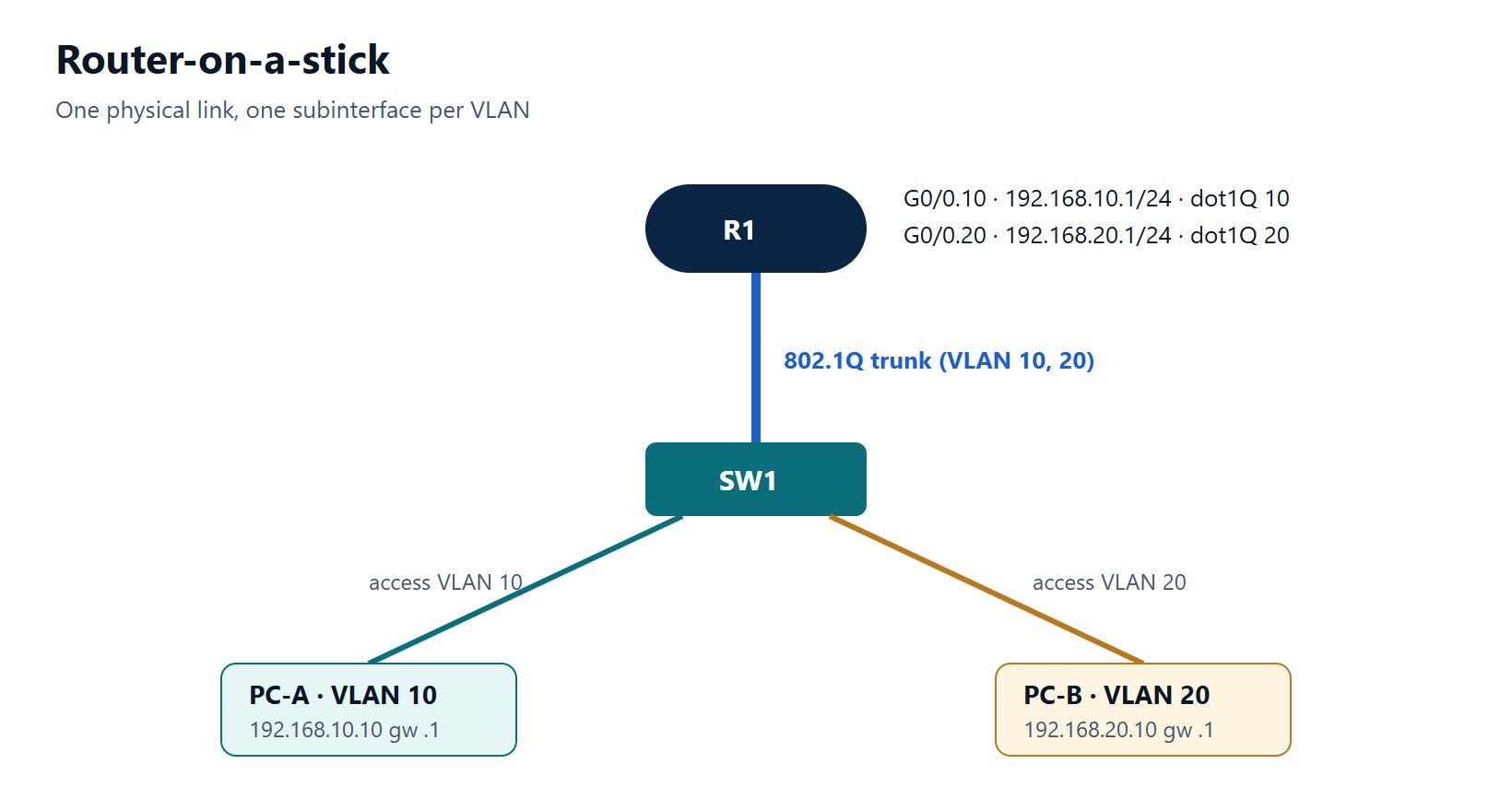
Objectives
- Configure router-on-a-stick subinterfaces.
- Replace it with SVIs on a Layer 3 switch.
- Compare the two designs and their failure modes.
Addressing
| Device | Interface | Address |
|---|---|---|
| R1 | G0/0/0.10 | 192.168.10.1/24 |
| R1 | G0/0/0.20 | 192.168.20.1/24 |
| PC-A (VLAN 10) | NIC | 192.168.10.10/24, gw 192.168.10.1 |
| PC-B (VLAN 20) | NIC | 192.168.20.10/24, gw 192.168.20.1 |
Part 1 — router-on-a-stick
- On SW1: VLANs 10 and 20, PC ports as access ports, uplink to R1 as a trunk allowing 10 and 20.
- On R1: bring up G0/0/0 and create subinterfaces .10 and .20 with
encapsulation dot1Qand the gateway addresses. - Test PC-A → PC-B.
Part 2 — Layer 3 switch
- Shut R1's G0/0/0. On a multilayer switch (for example a 3650/9300 in your lab platform), enable routing and create SVIs for VLAN 10 and 20 with the same gateway addresses.
- Test again.
Verification
show ip route connectedon R1 (part 1) or the L3 switch (part 2) lists both /24 networks.tracert 192.168.20.10from PC-A shows exactly one hop (the gateway) before the destination.show interfaces G0/0/0.10showsEncapsulation 802.1Q Virtual LAN, Vlan ID 10.
Challenge
Change subinterface .20 to encapsulation dot1Q 21. Which symptoms appear, and which show command reveals the mistake fastest?
Show the solution
Part 1:
SW1(config)# vlan 10
SW1(config-vlan)# vlan 20
SW1(config-vlan)# exit
SW1(config)# interface GigabitEthernet1/0/1
SW1(config-if)# switchport mode access
SW1(config-if)# switchport access vlan 10
SW1(config-if)# interface GigabitEthernet1/0/11
SW1(config-if)# switchport mode access
SW1(config-if)# switchport access vlan 20
SW1(config-if)# interface GigabitEthernet1/0/24
SW1(config-if)# switchport mode trunk
SW1(config-if)# switchport trunk allowed vlan 10,20

R1(config)# interface GigabitEthernet0/0/0
R1(config-if)# no shutdown
R1(config-if)# interface GigabitEthernet0/0/0.10
R1(config-subif)# encapsulation dot1Q 10
R1(config-subif)# ip address 192.168.10.1 255.255.255.0
R1(config-subif)# interface GigabitEthernet0/0/0.20
R1(config-subif)# encapsulation dot1Q 20
R1(config-subif)# ip address 192.168.20.1 255.255.255.0
Part 2 (on the Layer 3 switch):
L3SW(config)# ip routing
L3SW(config)# interface vlan 10
L3SW(config-if)# ip address 192.168.10.1 255.255.255.0
L3SW(config-if)# no shutdown
L3SW(config-if)# interface vlan 20
L3SW(config-if)# ip address 192.168.20.1 255.255.255.0
L3SW(config-if)# no shutdown
Challenge: with dot1Q 21, PC-B cannot even ping its gateway (VLAN 20 frames arrive tagged 20, but the router only accepts tag 21 on that subinterface). PC-A is unaffected. show interfaces GigabitEthernet0/0/0.20 (or show running-config interface GigabitEthernet0/0/0.20) shows the wrong VLAN ID immediately.