// Practice lab
CCNA lab 11: IPv6 dual stack and static routing
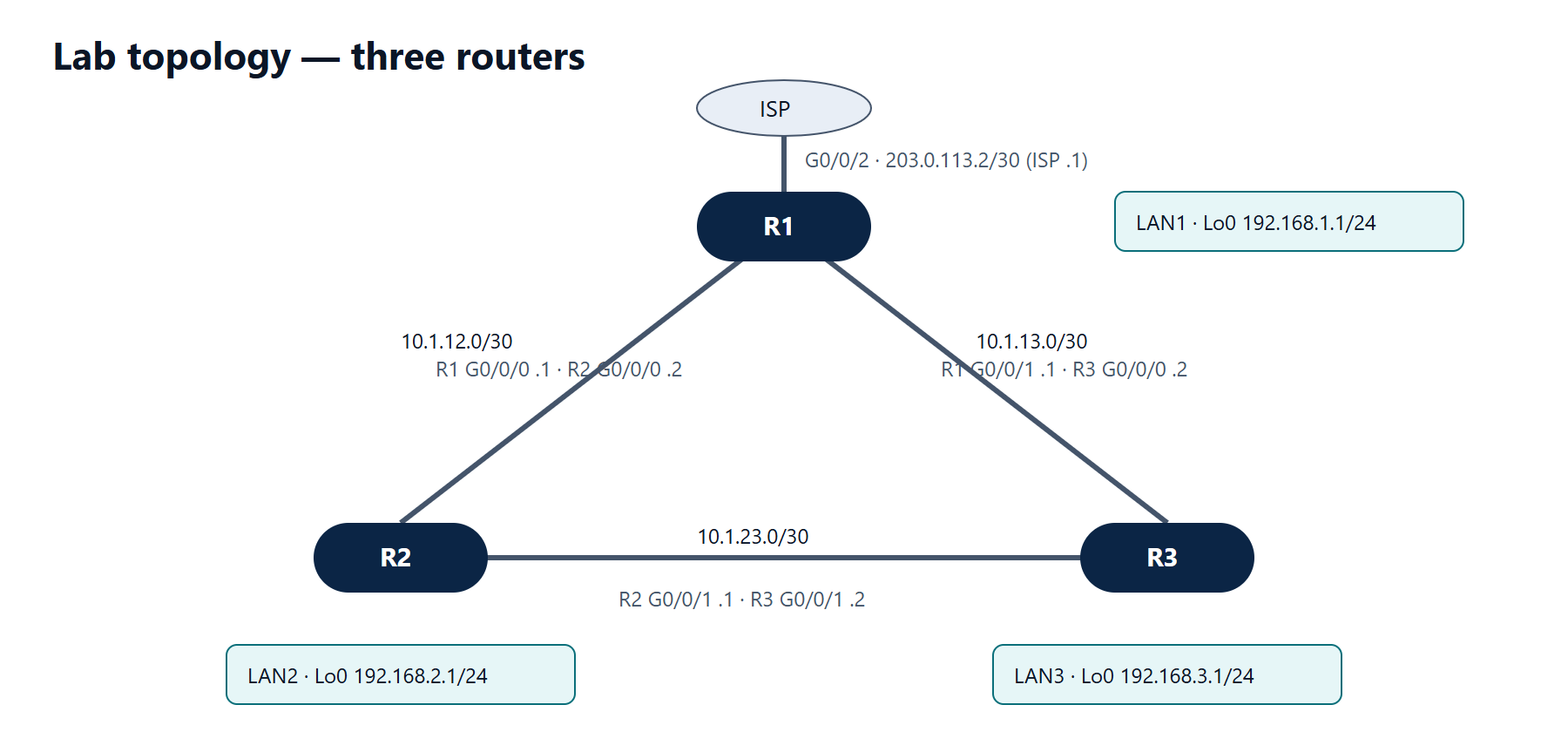
Add IPv6 to the three-router topology, use simple link-local addresses, route with static IPv6 routes and let hosts autoconfigure with SLAAC.
1 min read#ccna#ipv6#lab
Objectives
- Enable IPv6 routing and assign global and link-local addresses.
- Route between LANs with static routes using link-local next hops.
- Verify SLAAC on a host.
IPv6 addressing (in addition to the IPv4 from lab 6)
| Link / LAN | Prefix | Router addresses |
|---|---|---|
| R1–R2 | 2001:db8:acad:12::/64 | R1 ::1, R2 ::2 |
| R1–R3 | 2001:db8:acad:13::/64 | R1 ::1, R3 ::3 |
| R2–R3 | 2001:db8:acad:23::/64 | R2 ::2, R3 ::3 |
| LAN1 (R1 G0/0/3 or Lo0) | 2001:db8:acad:1::/64 | ::1 |
| LAN2 | 2001:db8:acad:2::/64 | ::1 |
| LAN3 | 2001:db8:acad:3::/64 | ::1 |
Link-local: use fe80::1 on every R1 interface, fe80::2 on R2 and fe80::3 on R3.
Tasks
- Enable
ipv6 unicast-routingon all routers. - Configure the global and link-local addresses.
- Add static routes so every LAN reaches every other LAN, using link-local next hops over the direct links.
- Connect a PC to LAN2 (on a real Ethernet interface) and set it to obtain IPv6 automatically.
Verification
show ipv6 interface brief— each interface shows FE80::x and its global address.show ipv6 route static— routes with next hops likeFE80::1and an exit interface.- PC:
ipconfigshows an address in 2001:db8:acad:2::/64 and default gatewayfe80::2. ping 2001:db8:acad:3::1from the PC succeeds.
Show the solution
R2 as the example (repeat the pattern on R1 and R3):
R2(config)# ipv6 unicast-routing
R2(config)# interface GigabitEthernet0/0/0
R2(config-if)# ipv6 address 2001:db8:acad:12::2/64
R2(config-if)# ipv6 address fe80::2 link-local
R2(config-if)# interface GigabitEthernet0/0/1
R2(config-if)# ipv6 address 2001:db8:acad:23::2/64
R2(config-if)# ipv6 address fe80::2 link-local
R2(config-if)# interface GigabitEthernet0/0/2
R2(config-if)# ipv6 address 2001:db8:acad:2::1/64
R2(config-if)# ipv6 address fe80::2 link-local
R2(config-if)# no shutdown
R2(config-if)# exit
R2(config)# ipv6 route 2001:db8:acad:1::/64 GigabitEthernet0/0/0 fe80::1
R2(config)# ipv6 route 2001:db8:acad:3::/64 GigabitEthernet0/0/1 fe80::3
R1 needs routes to LAN2 via G0/0/0 fe80::2 and to LAN3 via G0/0/1 fe80::3; R3 needs routes to LAN1 via G0/0/0 fe80::1 and to LAN2 via G0/0/1 fe80::2.
The PC receives the /64 prefix in R2's Router Advertisements (sent because ipv6 unicast-routing is on) and builds its own address with SLAAC. Its default gateway is R2's link-local address, fe80::2 — routers always advertise themselves with their link-local address.