// Practice lab
CCNA lab 7: Single-area OSPFv2
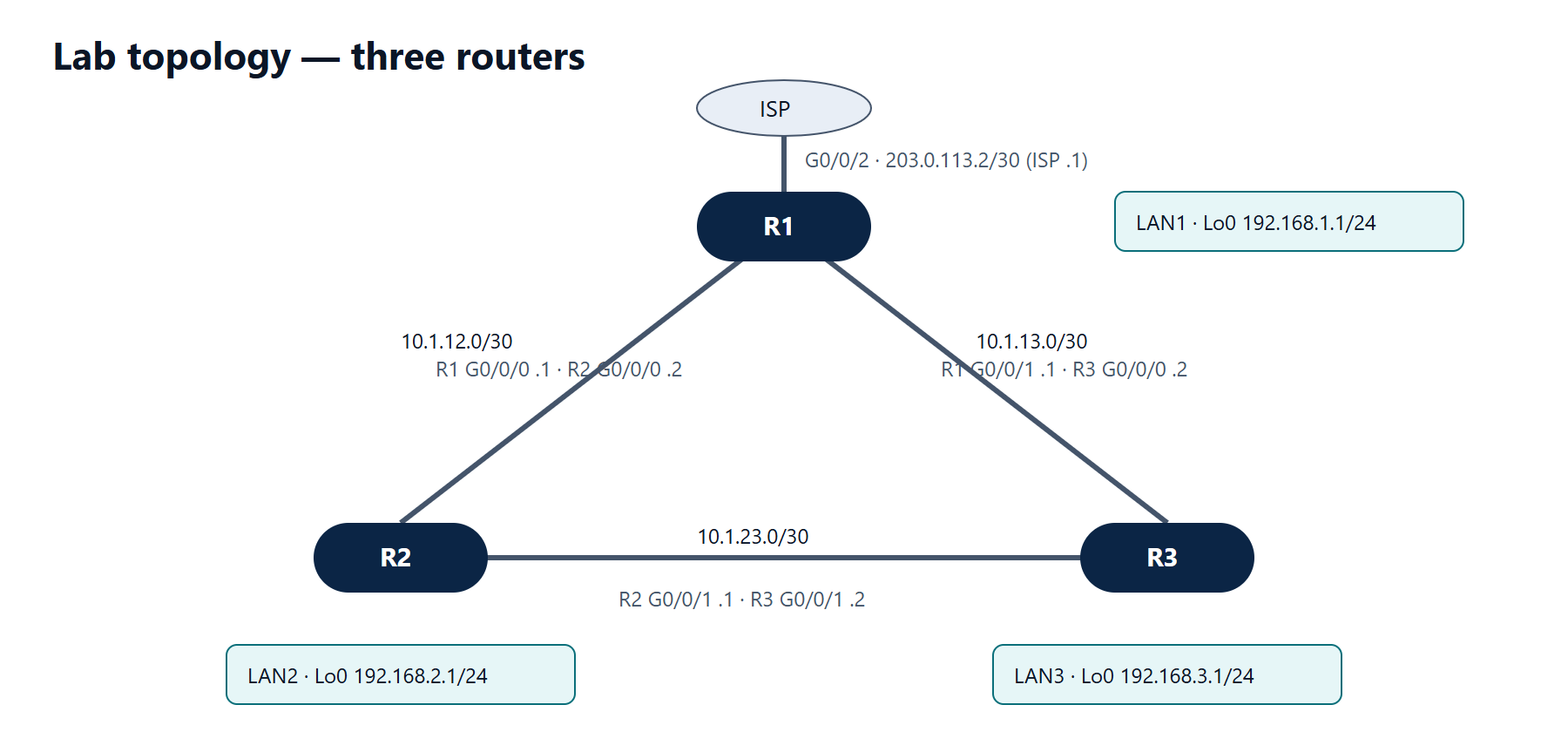
Objectives
- Run OSPF process 1, area 0 on all three routers with fixed router IDs.
- Advertise the loopback LANs without sending hellos on them.
- Avoid DR/BDR elections on the /30 links.
- Make OSPF prefer R1 → R2 → R3 over the direct R1 → R3 link for 192.168.3.0/24.
- Share R1's default route with the area.
- Diagnose a neighbour that will not form.
Starting point
Use the addressing from lab 6. Remove all static routes except R1's default route.
| Router | Router ID |
|---|---|
| R1 | 1.1.1.1 |
| R2 | 2.2.2.2 |
| R3 | 3.3.3.3 |
Tasks
- Enable OSPF on every interface except R1's ISP link. Make the loopbacks passive.
- Set
ip ospf network point-to-pointon all router-to-router links. - Set the reference bandwidth to 100 Gbps on all routers.
- On R1, originate the default route into OSPF.
- Make the direct R1–R3 link less attractive than the path through R2 by raising its cost.
- Fault: on R3 set
ip ospf hello-interval 5on G0/0/1 only. Observe the R2–R3 adjacency, then fix it.
Verification
show ip ospf neighbor— each router has two neighbours in state FULL/ - (point-to-point: no DR/BDR).show ip route ospfon R2 showsO*E2 0.0.0.0/0and both remote LANs.- On R1,
show ip route 192.168.3.0shows the next hop 10.1.12.2 (via R2) after task 5. show ip ospf interface briefshows the loopbacks with no neighbours.
Show the solution
R1:
R1(config)# no ip route 192.168.2.0 255.255.255.0 10.1.12.2
R1(config)# no ip route 192.168.3.0 255.255.255.0 10.1.13.2
R1(config)# no ip route 192.168.2.0 255.255.255.0 10.1.13.2 200
R1(config)# no ip route 192.168.3.0 255.255.255.0 10.1.12.2 200
R1(config)# router ospf 1
R1(config-router)# router-id 1.1.1.1
R1(config-router)# auto-cost reference-bandwidth 100000
R1(config-router)# network 10.1.12.0 0.0.0.3 area 0
R1(config-router)# network 10.1.13.0 0.0.0.3 area 0
R1(config-router)# network 192.168.1.0 0.0.0.255 area 0
R1(config-router)# passive-interface Loopback0
R1(config-router)# default-information originate
R1(config-router)# exit
R1(config)# interface range GigabitEthernet0/0/0 - 1
R1(config-if-range)# ip ospf network point-to-point
R1(config-if-range)# exit
R1(config)# interface GigabitEthernet0/0/1
R1(config-if)# ip ospf cost 1000
R2 (remove its static routes the same way first):
R2(config)# router ospf 1
R2(config-router)# router-id 2.2.2.2
R2(config-router)# auto-cost reference-bandwidth 100000
R2(config-router)# network 10.1.12.0 0.0.0.3 area 0
R2(config-router)# network 10.1.23.0 0.0.0.3 area 0
R2(config-router)# network 192.168.2.0 0.0.0.255 area 0
R2(config-router)# passive-interface Loopback0
R2(config-router)# exit
R2(config)# interface range GigabitEthernet0/0/0 - 1
R2(config-if-range)# ip ospf network point-to-point
R3:
R3(config)# router ospf 1
R3(config-router)# router-id 3.3.3.3
R3(config-router)# auto-cost reference-bandwidth 100000
R3(config-router)# network 10.1.13.0 0.0.0.3 area 0
R3(config-router)# network 10.1.23.0 0.0.0.3 area 0
R3(config-router)# network 192.168.3.0 0.0.0.255 area 0
R3(config-router)# passive-interface Loopback0
R3(config-router)# exit
R3(config)# interface range GigabitEthernet0/0/0 - 1
R3(config-if-range)# ip ospf network point-to-point
R3(config-if-range)# exit
R3(config)# interface GigabitEthernet0/0/0
R3(config-if)# ip ospf cost 1000
With a 100 Gbps reference, each 1 Gbps link costs 100. The path R1 → R2 → R3 costs 100 + 100 = 200 plus the loopback's cost of 1, while the direct link now costs 1000, so the path through R2 wins. Set the cost on both ends of the R1–R3 link so traffic in both directions behaves the same way.
Loopback note: OSPF advertises loopbacks as /32 host routes by default. To advertise the full /24, add ip ospf network point-to-point on each Loopback0 as well.
Task 6: R2 and R3 stop seeing each other — the neighbour drops when its dead timer expires and does not come back, because hello and dead intervals must match. show ip ospf interface GigabitEthernet0/0/1 on both routers shows Hello 5, Dead 20 on R3 and Hello 10, Dead 40 on R2. Fix with no ip ospf hello-interval on R3's G0/0/1.