// Practice lab
CCNA lab 4: Spanning Tree root and edge protection
Find the root bridge STP elected on its own, move it to the switch you choose, predict port roles, and protect edge ports with PortFast and BPDU Guard.
1 min read#ccna#stp#lab
Objectives
- Identify the root bridge and every port role in a triangle of three switches.
- Make SW1 the root for all VLANs and SW2 the backup root.
- Switch to Rapid PVST+.
- Enable PortFast and BPDU Guard on access ports and watch BPDU Guard act.
Setup
Three switches cabled in a triangle (SW1–SW2, SW1–SW3, SW2–SW3), all links trunks. Create VLAN 10 on all three. Connect one PC to SW3 G1/0/5 in VLAN 10.
Tasks
- Before changing anything, run
show spanning-tree vlan 10on all three switches. Which switch is root, and why? Draw the port roles. - Make SW1 root primary and SW2 root secondary for VLANs 1 and 10.
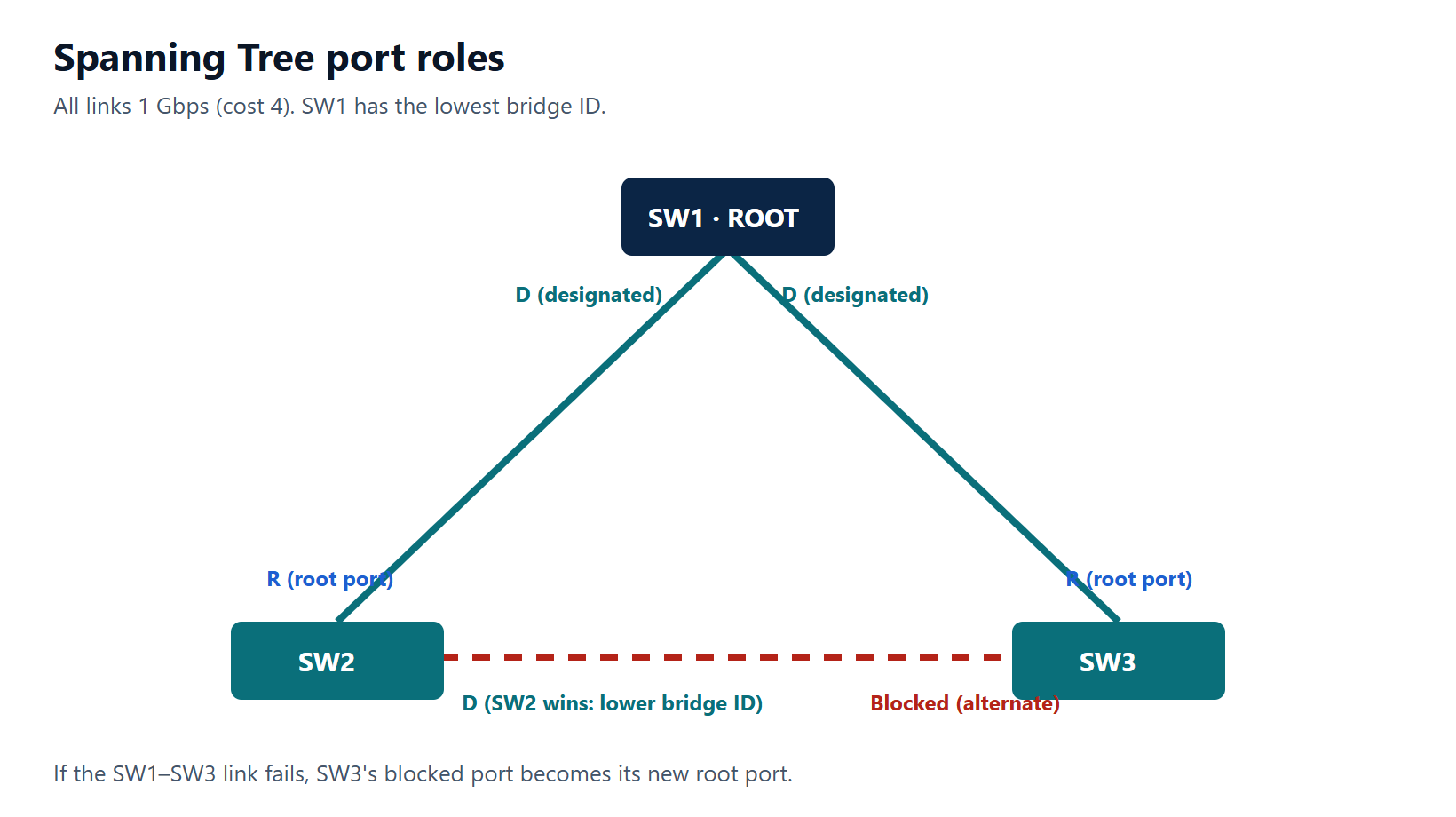
- Predict the new roles, then check them. Which port is blocked now?
- Enable Rapid PVST+ on all switches.
- On SW3 G1/0/5 enable PortFast and BPDU Guard.
- Replace the PC with a switch (or enable a BPDU-sending device). What happens to G1/0/5? Recover it.
Verification
show spanning-tree root— every VLAN shows SW1's bridge ID as root.show spanning-tree vlan 10on SW3 — one root port, one alternate (ALTN) port in the blocking/discarding state.show spanning-tree summary— moderapid-pvst.show interfaces status err-disabledlists G1/0/5 with reasonbpduguardafter task 6.
Show the solution
Task 1: with default priorities (32768 + VLAN ID), the switch with the lowest MAC address becomes root — often the oldest. That is why you set it deliberately.
Tasks 2 and 4:
SW1(config)# spanning-tree mode rapid-pvst
SW1(config)# spanning-tree vlan 1,10 root primary
SW2(config)# spanning-tree mode rapid-pvst
SW2(config)# spanning-tree vlan 1,10 root secondary
SW3(config)# spanning-tree mode rapid-pvst
Task 3: SW2 and SW3 each use their direct link to SW1 as root port. On the SW2–SW3 link both have cost 4 to the root; SW2 has the lower bridge ID (priority 28672 after root secondary), so SW2's port is designated and SW3's port is the alternate (blocked).
Task 5:
SW3(config)# interface GigabitEthernet1/0/5
SW3(config-if)# switchport mode access
SW3(config-if)# switchport access vlan 10
SW3(config-if)# spanning-tree portfast
SW3(config-if)# spanning-tree bpduguard enable
Task 6: when a BPDU arrives, the port goes err-disabled and the log shows %SPANTREE-2-BLOCK_BPDUGUARD. Remove the switch, then:
SW3(config)# interface GigabitEthernet1/0/5
SW3(config-if)# shutdown
SW3(config-if)# no shutdown