// Practice lab
CCNA lab 6: Static, default and floating static routes
Route between three LANs with static routes, add a default route to the ISP, and build a backup path with a floating static route.
1 min read#ccna#static-routing#lab
Objectives
- Configure point-to-point addressing and loopback LANs.
- Reach every LAN with static routes, using the direct path.
- Send internet traffic to the ISP with a default route.
- Provide automatic failover with floating static routes.
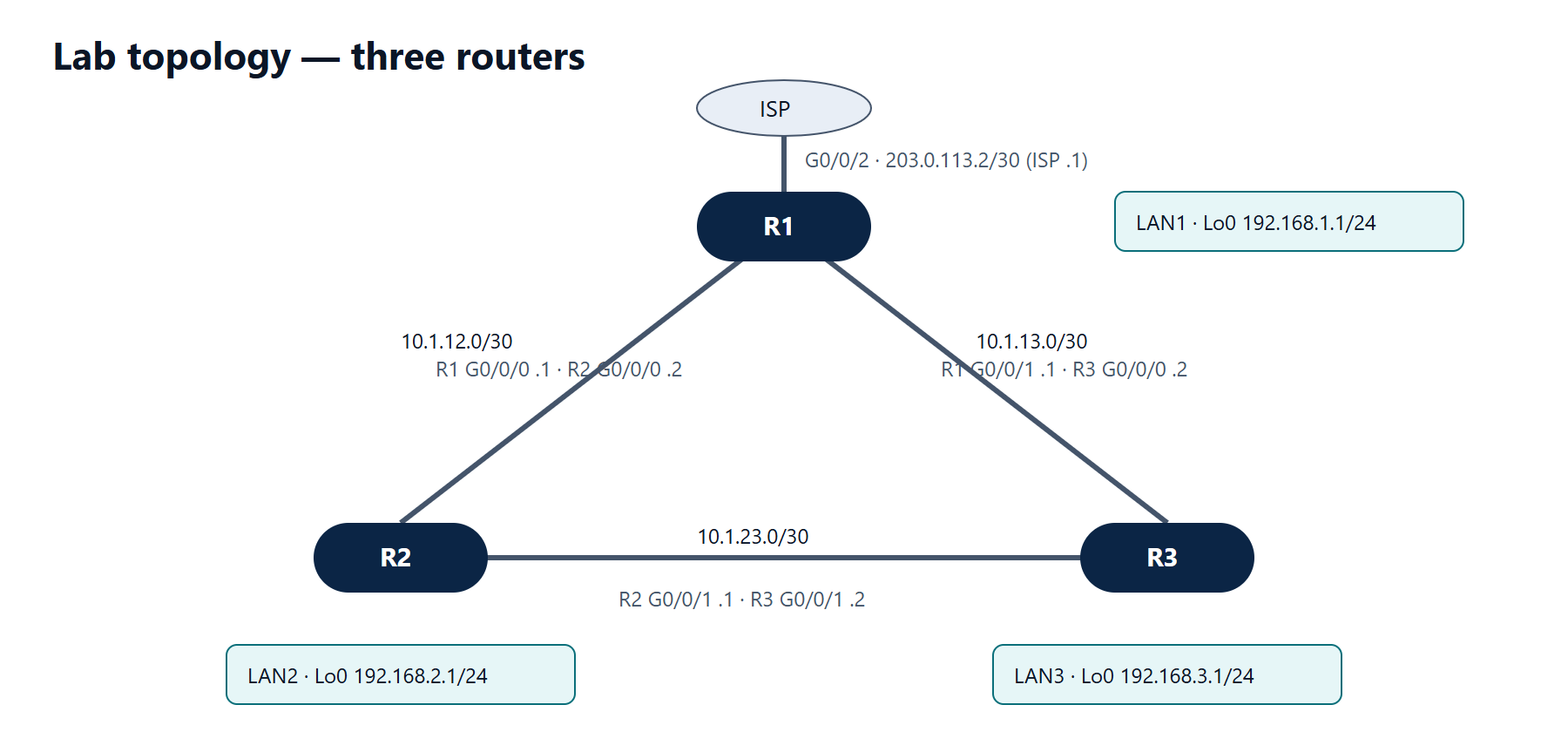
Addressing
| Device | Interface | Address |
|---|---|---|
| R1 | G0/0/0 | 10.1.12.1/30 |
| R1 | G0/0/1 | 10.1.13.1/30 |
| R1 | G0/0/2 | 203.0.113.2/30 (ISP is .1) |
| R1 | Loopback0 | 192.168.1.1/24 |
| R2 | G0/0/0 | 10.1.12.2/30 |
| R2 | G0/0/1 | 10.1.23.1/30 |
| R2 | Loopback0 | 192.168.2.1/24 |
| R3 | G0/0/0 | 10.1.13.2/30 |
| R3 | G0/0/1 | 10.1.23.2/30 |
| R3 | Loopback0 | 192.168.3.1/24 |
Tasks
- Configure all interfaces and loopbacks.
- On each router, add static routes to the other two LANs using the direct link.
- On R1 add a default route to the ISP. On R2 and R3 add default routes pointing to R1.
- Add floating static routes (AD 200) on R2 and R3 for each other's LAN via R1, and on R1 via the third router, so traffic survives any single link failure.
- Test: shut the R2–R3 link and confirm R2 still reaches 192.168.3.1.
Verification
show ip route static— floating routes are not shown while the primary path is up.ping 192.168.3.1 source 192.168.2.1from R2 succeeds before and after the link failure.traceroute 192.168.3.1 source 192.168.2.1shows the path change (via 10.1.12.1 after the failure).
Show the solution
R1:
R1(config)# interface GigabitEthernet0/0/0
R1(config-if)# ip address 10.1.12.1 255.255.255.252
R1(config-if)# no shutdown
R1(config-if)# interface GigabitEthernet0/0/1
R1(config-if)# ip address 10.1.13.1 255.255.255.252
R1(config-if)# no shutdown
R1(config-if)# interface GigabitEthernet0/0/2
R1(config-if)# ip address 203.0.113.2 255.255.255.252
R1(config-if)# no shutdown
R1(config-if)# interface Loopback0
R1(config-if)# ip address 192.168.1.1 255.255.255.0
R1(config-if)# exit
R1(config)# ip route 192.168.2.0 255.255.255.0 10.1.12.2
R1(config)# ip route 192.168.3.0 255.255.255.0 10.1.13.2
R1(config)# ip route 0.0.0.0 0.0.0.0 203.0.113.1
R1(config)# ip route 192.168.2.0 255.255.255.0 10.1.13.2 200
R1(config)# ip route 192.168.3.0 255.255.255.0 10.1.12.2 200
R2:
R2(config)# interface GigabitEthernet0/0/0
R2(config-if)# ip address 10.1.12.2 255.255.255.252
R2(config-if)# no shutdown
R2(config-if)# interface GigabitEthernet0/0/1
R2(config-if)# ip address 10.1.23.1 255.255.255.252
R2(config-if)# no shutdown
R2(config-if)# interface Loopback0
R2(config-if)# ip address 192.168.2.1 255.255.255.0
R2(config-if)# exit
R2(config)# ip route 192.168.1.0 255.255.255.0 10.1.12.1
R2(config)# ip route 192.168.3.0 255.255.255.0 10.1.23.2
R2(config)# ip route 0.0.0.0 0.0.0.0 10.1.12.1
R2(config)# ip route 192.168.3.0 255.255.255.0 10.1.12.1 200
R3 mirrors R2:
R3(config)# interface GigabitEthernet0/0/0
R3(config-if)# ip address 10.1.13.2 255.255.255.252
R3(config-if)# no shutdown
R3(config-if)# interface GigabitEthernet0/0/1
R3(config-if)# ip address 10.1.23.2 255.255.255.252
R3(config-if)# no shutdown
R3(config-if)# interface Loopback0
R3(config-if)# ip address 192.168.3.1 255.255.255.0
R3(config-if)# exit
R3(config)# ip route 192.168.1.0 255.255.255.0 10.1.13.1
R3(config)# ip route 192.168.2.0 255.255.255.0 10.1.23.1
R3(config)# ip route 0.0.0.0 0.0.0.0 10.1.13.1
R3(config)# ip route 192.168.2.0 255.255.255.0 10.1.13.1 200
When the R2–R3 link goes down, the routes via 10.1.23.x are removed (their next hop is no longer on a connected network) and the AD-200 routes via R1 take their place. R1 already reaches both LANs directly, so the return path works too. A real ISP would also need a route back to the 192.168 networks — in practice NAT on R1 handles this (lab 8).