// Practice lab
CCNA lab 2: VLANs and 802.1Q trunks
Create VLANs on two switches, assign access ports, build a trunk with a safe native VLAN and a pruned allowed list, and prove it works.
1 min read#ccna#vlan#trunk#lab
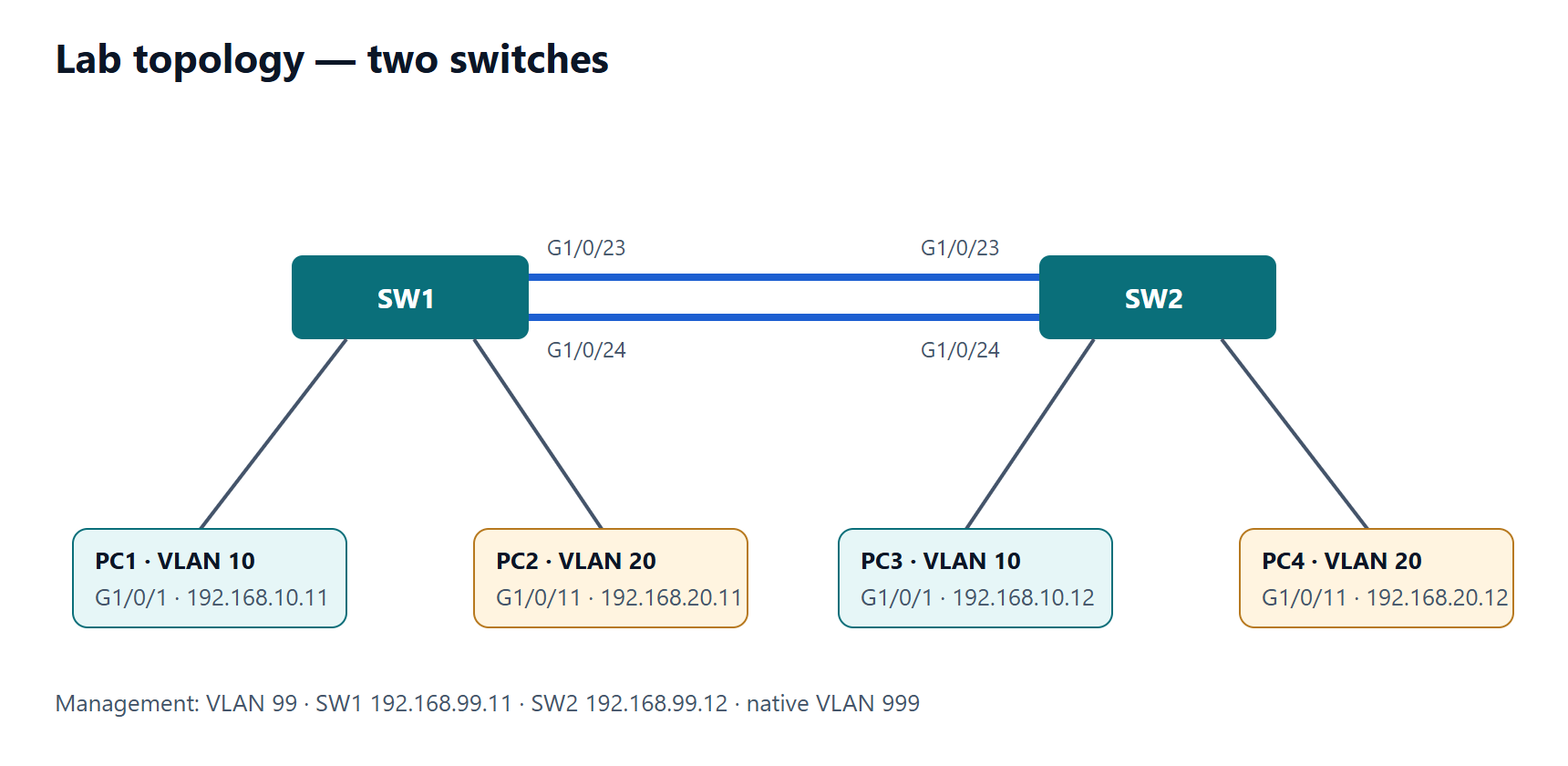
Objectives
- Create and name VLANs consistently on two switches.
- Assign PC ports to the correct VLANs.
- Configure an 802.1Q trunk with native VLAN 999, DTP disabled and only the needed VLANs allowed.
- Verify same-VLAN connectivity across switches and isolation between VLANs.
Addressing
| Host | Switch port | VLAN | Address |
|---|---|---|---|
| PC1 | SW1 G1/0/1 | 10 | 192.168.10.11/24 |
| PC2 | SW1 G1/0/11 | 20 | 192.168.20.11/24 |
| PC3 | SW2 G1/0/1 | 10 | 192.168.10.12/24 |
| PC4 | SW2 G1/0/11 | 20 | 192.168.20.12/24 |
Use only link G1/0/24 between the switches in this lab (shut G1/0/23 on both).
Tasks
- On both switches create VLAN 10 STAFF, VLAN 20 GUEST, VLAN 99 MGMT and VLAN 999 NATIVE-UNUSED.
- Make the PC ports access ports in the right VLANs.
- Configure G1/0/24 on both switches as a static trunk: native VLAN 999, DTP off, allowed VLANs 10, 20, 99.
- Test: PC1 → PC3 and PC2 → PC4 succeed; PC1 → PC4 fails (different VLAN and subnet, no router yet).
- Break it: remove VLAN 20 from the allowed list on SW2 only. What fails? Fix it using
allowed vlan add.
Verification
show vlan brief— PCs in the right VLANs; the trunk port is not listed.show interfaces trunk— mode on, native 999, allowed 10,20,99 in all three lists.show interfaces G1/0/24 switchport— Negotiation of Trunking: Off.- No
%CDP-4-NATIVE_VLAN_MISMATCHmessages in the log.
Show the solution
Apply on both switches:
SW1(config)# vlan 10
SW1(config-vlan)# name STAFF
SW1(config-vlan)# vlan 20
SW1(config-vlan)# name GUEST
SW1(config-vlan)# vlan 99
SW1(config-vlan)# name MGMT
SW1(config-vlan)# vlan 999
SW1(config-vlan)# name NATIVE-UNUSED
SW1(config-vlan)# exit
SW1(config)# interface GigabitEthernet1/0/1
SW1(config-if)# switchport mode access
SW1(config-if)# switchport access vlan 10
SW1(config-if)# interface GigabitEthernet1/0/11
SW1(config-if)# switchport mode access
SW1(config-if)# switchport access vlan 20
SW1(config-if)# interface GigabitEthernet1/0/23
SW1(config-if)# shutdown
SW1(config-if)# interface GigabitEthernet1/0/24
SW1(config-if)# switchport mode trunk
SW1(config-if)# switchport trunk native vlan 999
SW1(config-if)# switchport trunk allowed vlan 10,20,99
SW1(config-if)# switchport nonegotiate
Step 5: after switchport trunk allowed vlan 10,99 on SW2, PC2 → PC4 fails while VLAN 10 still works. show interfaces trunk on SW2 shows VLAN 20 missing from "Vlans allowed on trunk". Fix:
SW2(config)# interface GigabitEthernet1/0/24
SW2(config-if)# switchport trunk allowed vlan add 20
PC1 → PC4 failing is expected: different VLANs need a router — that is the next lab.