// Lesson 20 of 49 · Switching and VLANs
Inter-VLAN routing
Hosts in different VLANs are in different subnets, so they need a router — their default gateway — to talk to each other. There are two common ways to provide it.
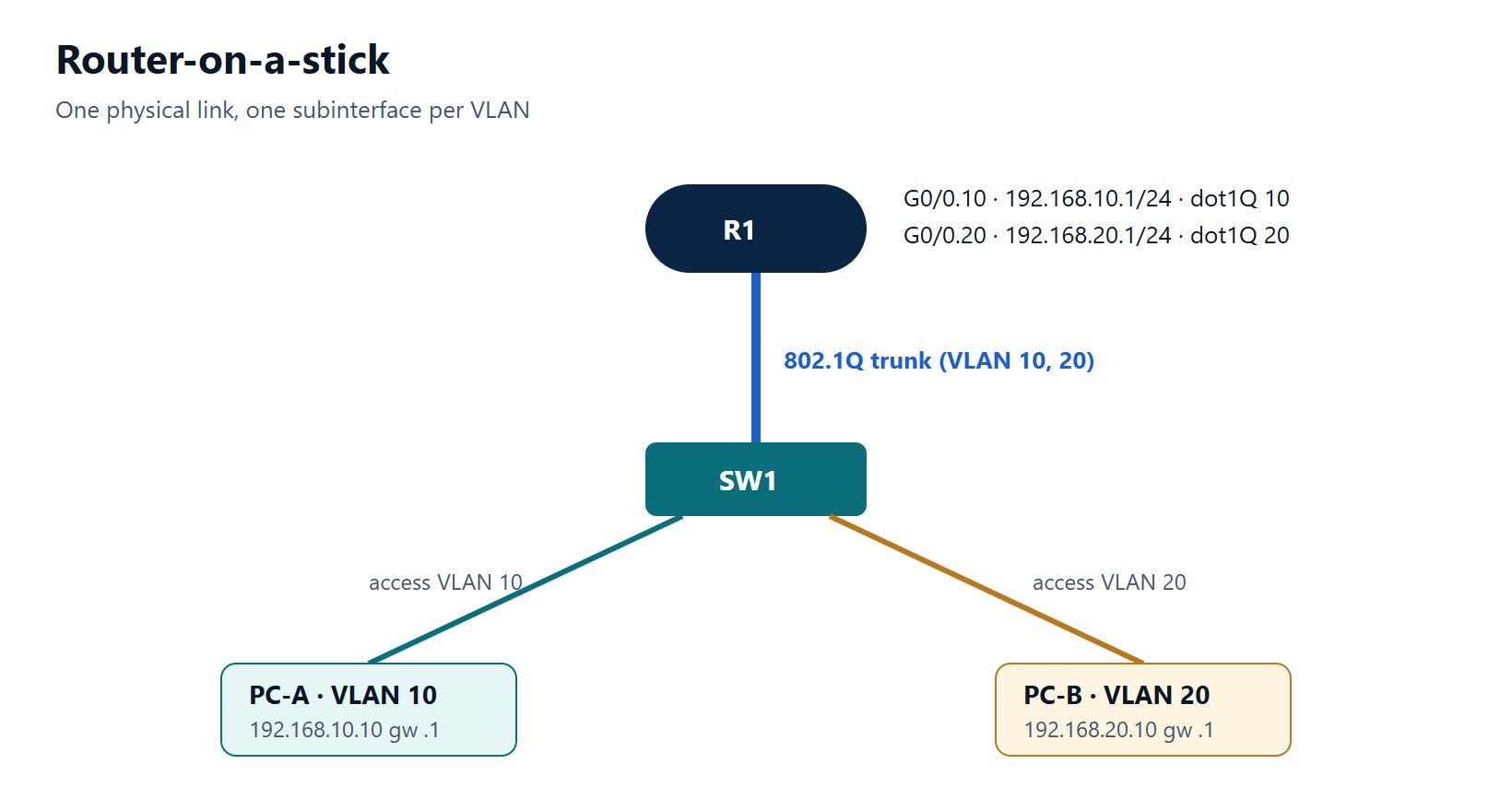
Option 1: router-on-a-stick
One router interface connects to a switch trunk. The router has one subinterface per VLAN, each with the VLAN's gateway address.
Switch side:
SW1(config)# interface GigabitEthernet1/0/24
SW1(config-if)# switchport mode trunk
SW1(config-if)# switchport trunk allowed vlan 10,20
Router side:
R1(config)# interface GigabitEthernet0/0
R1(config-if)# no shutdown
R1(config-if)# interface GigabitEthernet0/0.10
R1(config-subif)# encapsulation dot1Q 10
R1(config-subif)# ip address 192.168.10.1 255.255.255.0
R1(config-subif)# interface GigabitEthernet0/0.20
R1(config-subif)# encapsulation dot1Q 20
R1(config-subif)# ip address 192.168.20.1 255.255.255.0
The subinterface number does not have to match the VLAN, but making it match avoids confusion. If one VLAN should be the native VLAN, use encapsulation dot1Q 99 native.
Limitation: all inter-VLAN traffic shares one physical link, in and out — fine for small sites, a bottleneck for large ones.
Option 2: SVIs on a Layer 3 switch
A switch virtual interface (SVI) is a virtual routed interface for a VLAN, inside the switch itself.
SW1(config)# ip routing
SW1(config)# interface vlan 10
SW1(config-if)# ip address 192.168.10.1 255.255.255.0
SW1(config-if)# no shutdown
SW1(config)# interface vlan 20
SW1(config-if)# ip address 192.168.20.1 255.255.255.0
SW1(config-if)# no shutdown
ip routingmust be enabled, or the switch will not route between SVIs.- An SVI is up/up only when the VLAN exists and at least one port in it (access or trunk) is up and forwarding.
Routing happens in hardware at wire speed, which is why this is the normal design in campus distribution layers.
Routed ports
A Layer 3 switch port can also behave like a router interface:
SW1(config)# interface GigabitEthernet1/0/48
SW1(config-if)# no switchport
SW1(config-if)# ip address 10.0.0.1 255.255.255.252
Used for point-to-point links to other Layer 3 devices.
Verify
R1# show ip interface brief
R1# show interfaces GigabitEthernet0/0.10
R1# show ip route connected
SW1# show ip interface brief | include Vlan
Then test from a host: ping its own gateway, then a host in the other VLAN.
Typical faults
| Symptom | Likely cause |
|---|---|
| Hosts can ping their gateway but not the other VLAN | ip routing missing (L3 switch) or wrong host gateway |
| One VLAN fails on router-on-a-stick | Wrong encapsulation dot1Q VLAN ID, or VLAN not allowed on the trunk |
| SVI down/down | VLAN not created, or no active port in it |
Key points
- Router-on-a-stick: trunk + one subinterface with
encapsulation dot1Qper VLAN. - L3 switch:
ip routing+interface vlan N. - SVIs come up only when their VLAN has an active port.
- Routed ports use
no switchport.
Sign in to save your lesson progress across devices. You can read every published lesson without an account.