// Lesson 2 of 49 · Network fundamentals
The OSI and TCP/IP models
Network models split communication into layers. Each layer has one job and only talks to the layers directly above and below it. This lets a web browser work the same over Wi-Fi, fibre or a mobile network — the lower layers change, the upper layers do not notice.
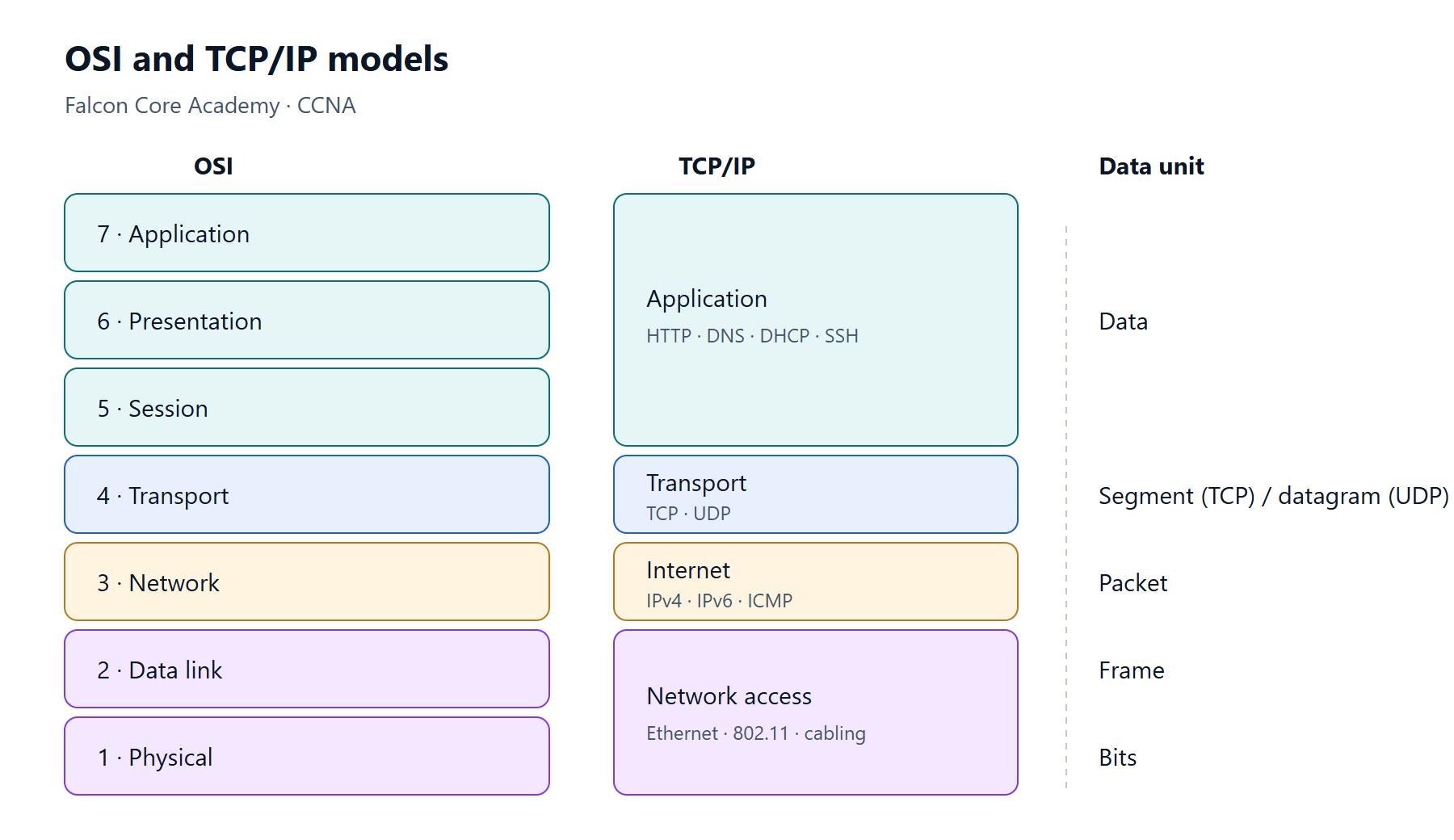
The OSI model
| # | Layer | Job | Examples | Data unit |
|---|---|---|---|---|
| 7 | Application | Network services for applications | HTTP, DNS, SMTP | Data |
| 6 | Presentation | Format, encryption, compression | TLS (often placed here), JPEG | Data |
| 5 | Session | Opening and closing conversations | Session setup and teardown | Data |
| 4 | Transport | End-to-end delivery between applications | TCP, UDP | Segment / datagram |
| 3 | Network | Logical addressing and routing | IPv4, IPv6, ICMP, OSPF | Packet |
| 2 | Data link | Delivery on one local link | Ethernet, 802.11, MAC addresses | Frame |
| 1 | Physical | Bits on the medium | Copper, fibre, radio | Bits |
A common memory aid from the bottom up: Please Do Not Throw Sausage Pizza Away.
The TCP/IP model
The TCP/IP model is what the internet actually runs on. It merges some OSI layers:
| TCP/IP layer | Matching OSI layers |
|---|---|
| Application | 5, 6, 7 |
| Transport | 4 |
| Internet | 3 |
| Network access (link) | 1, 2 |
Engineers still use OSI numbers in conversation — "it's a layer 2 problem" means a switching or VLAN problem.
Encapsulation
When a device sends data, each layer adds its own header (and Ethernet also adds a trailer):
- The application produces data — for example an HTTP request.
- Transport adds a TCP header with source and destination ports → a segment.
- Network adds an IP header with source and destination IP addresses → a packet.
- Data link adds an Ethernet header with MAC addresses and a trailer with the FCS (error check) → a frame.
- Physical sends it as bits.
The receiver does the reverse — de-encapsulation — removing one header at each layer.
An important detail: as a packet crosses routers, the IP addresses stay the same end to end, but the Ethernet header is rebuilt on every hop with new source and destination MAC addresses.
Using the models to troubleshoot
Work through the layers in order and prove each one before moving on:
- Physical — is the link up? Any errors on the interface?
- Data link — right VLAN? MAC address learned? Trunk allowing the VLAN?
- Network — right IP, mask and gateway? Route to the destination? Can you ping?
- Transport — is the port open? Is a firewall or ACL blocking it?
- Application — does DNS resolve? Does the service respond?
Key points
- OSI has 7 layers; TCP/IP has 4. Engineers use OSI numbers to describe problems.
- Data units: bits → frame → packet → segment → data.
- MAC addresses change at every hop; IP addresses do not (unless NAT is used).
- Troubleshoot one layer at a time, starting from the bottom.
Sign in to save your lesson progress across devices. You can read every published lesson without an account.