// Cisco
CCNA — Cisco Certified Network Associate
About this course
The CCNA is the most common starting point for a career in networking. This course teaches everything at that level the way engineers actually use it: every concept is followed by the configuration that implements it and the show commands that prove it works.
The course is written from scratch by Falcon Core. It is not an exam dump and contains no real exam questions — the practice questions check understanding, not memory.
How the course is organised
The course has nine modules that build on each other:
- Network fundamentals — devices, models, cabling, Ethernet, TCP/UDP
- IPv4 addressing and subnetting — binary, masks, subnetting, VLSM
- IPv6 — address format, types and configuration
- Switching and VLANs — IOS basics, VLANs, trunks, inter-VLAN routing, STP, EtherChannel, CDP/LLDP
- Wireless LANs — RF basics, architectures, security, WLC configuration
- IP routing — the routing table, static routes, OSPF, first-hop redundancy
- IP services — DHCP, NAT, DNS, NTP, SNMP, syslog, QoS, SSH
- Security fundamentals — threats, hardening, port security, ACLs, AAA, VPNs
- Automation and programmability — SDN, controllers, REST APIs, JSON, Ansible and friends
Each lesson ends with key points to remember. Labs, command references and practice questions are listed further down this page.
How to study
- Read a lesson once, without taking notes.
- Do the related lab in Packet Tracer — type every command yourself.
- Break the lab on purpose (wrong VLAN, wrong mask, shut an interface) and fix it using
showcommands. - Answer the practice questions for the module before looking at the explanations.
About 120 hours is a realistic total for someone new to networking: roughly half reading, half in the lab.
About the certification
The CCNA certification is awarded by Cisco after passing its associate-level exam. Exam codes, objectives and policies change over time — always check Cisco's official certification pages before booking. The certification details on this page were last reviewed on the date shown below.
Prerequisites
No previous networking experience is required. You should be comfortable using a computer, installing software and working with files and folders. A lab platform helps a lot: Cisco Packet Tracer is free and covers almost every lab in this course.
Learning objectives
- Explain how data moves through a network using the OSI and TCP/IP models
- Plan IPv4 addressing with subnetting and VLSM, and configure IPv6
- Build switched networks with VLANs, trunks, inter-VLAN routing, STP and EtherChannel
- Configure and verify static routing and single-area OSPFv2
- Describe wireless LAN architectures and secure a WLAN
- Configure DHCP, NAT/PAT, NTP, SNMP, syslog and SSH
- Harden devices and filter traffic with access control lists
- Explain controller-based networking, REST APIs, JSON and automation tools
- Troubleshoot layer by layer and prove the fix with show commands
Modules & lessons
MODULE 01
Network fundamentals
What networks are made of, how data is described by the OSI and TCP/IP models, and how bits travel over copper, fibre and Ethernet.
- 01What a network is made ofEndpoints, switches, routers, firewalls, access points, controllers and servers — what each one does and where it sits.
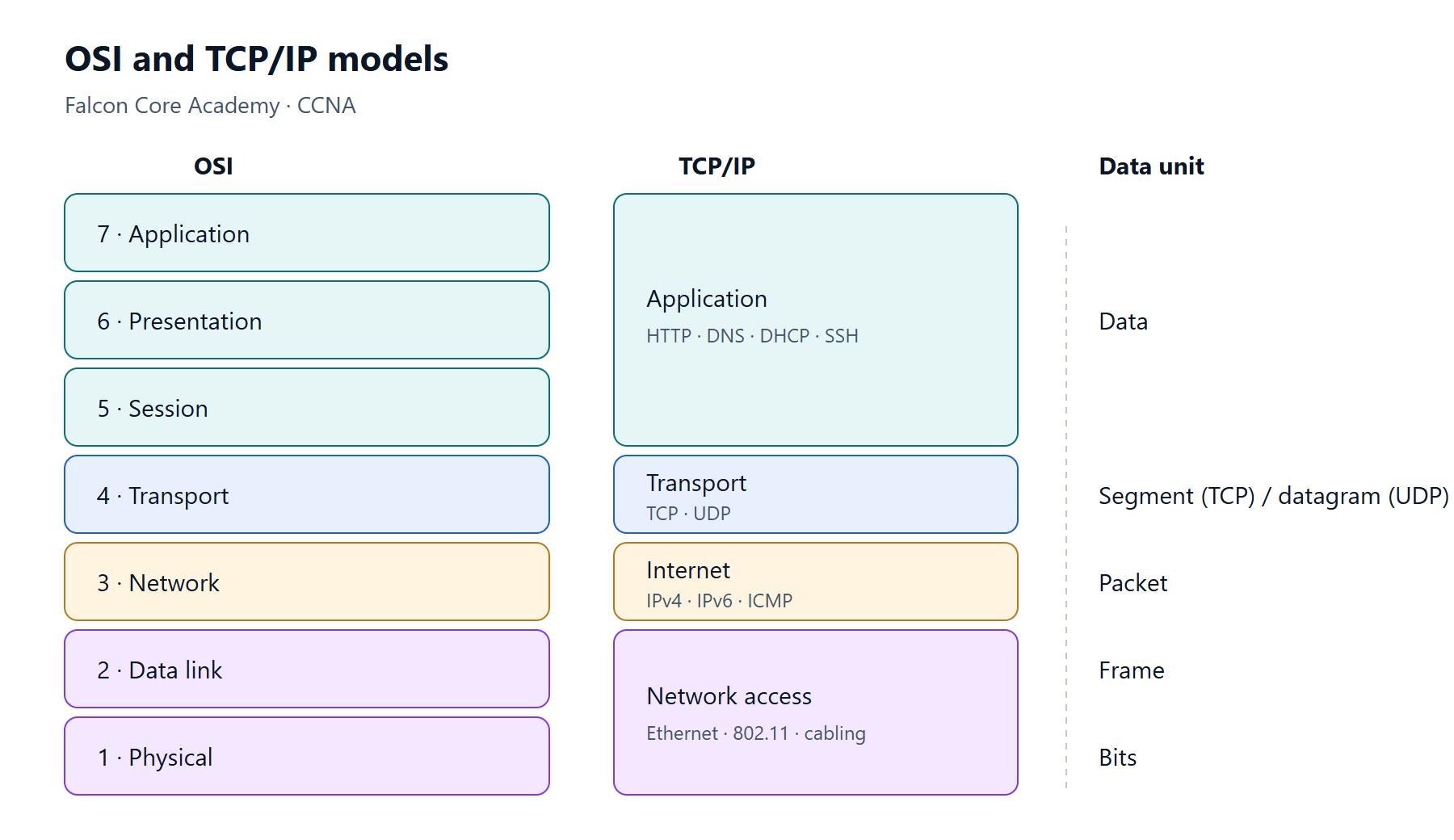
- 02The OSI and TCP/IP modelsThe seven OSI layers, the four TCP/IP layers, encapsulation and de-encapsulation, and how the models help you troubleshoot.
- 03Cabling and the physical layerCopper UTP categories and pinouts, straight-through vs crossover, auto-MDIX, fibre types and connectors, and Power over Ethernet.
- 04Ethernet frames and MAC addressesThe Ethernet frame format, MAC address structure, unicast, broadcast and multicast, and how ARP links IP to MAC.
- 05Network topologies and architecturesTwo-tier and three-tier campus designs, spine-leaf data centres, WAN and SOHO networks, and on-premises vs cloud.
- 06TCP, UDP and portsReliable vs best-effort transport, the three-way handshake, windowing, and the well-known port numbers you must know.
- 07Virtualisation fundamentalsVirtual machines, hypervisors, containers and VRFs — and what they change for the network.
MODULE 02
IPv4 addressing and subnetting
Binary, IPv4 address structure, masks and prefix lengths, subnetting and VLSM — the maths every network engineer uses daily.
- 08Binary and the IPv4 addressConverting between decimal and binary, the structure of an IPv4 address, private and special ranges.
- 09Subnet masks and prefix lengthsDotted masks vs CIDR prefixes, and how to find the network address, broadcast address and usable host range.
- 10Subnetting step by stepSplitting a block into equal subnets for a number of networks or a number of hosts, with worked examples.
- 11VLSM — addressing plans without wasteVariable-length subnet masks — allocating the largest networks first so every segment gets exactly what it needs.
- 12Verifying IP settings on hostsChecking and testing addressing on Windows, Linux and macOS clients — the first step of most support tickets.
MODULE 03
IPv6
Why IPv6 exists, how to read and shorten its addresses, the address types you will meet, and how to configure and route IPv6 on Cisco devices.
- 13IPv6 address formatWhy IPv6 exists, hexadecimal notation, the two shortening rules, and prefixes.
- 14IPv6 address types and autoconfigurationGlobal unicast, unique local, link-local, multicast and anycast addresses; EUI-64; SLAAC and DHCPv6.
- 15Configuring IPv6 on Cisco routersEnabling IPv6 routing, assigning addresses, verifying neighbours and routes, and static IPv6 routing.
MODULE 04
Switching and VLANs
Cisco IOS basics, how switches forward frames, VLANs, trunks, inter-VLAN routing, Spanning Tree, EtherChannel and discovery protocols.
- 16Cisco IOS basicsConsole access, IOS modes, help and shortcuts, basic device settings, and saving configuration.
- 17How a switch forwards framesMAC learning, forwarding, filtering, flooding and aging — the logic inside every Ethernet switch.
- 18VLANs and access portsWhy VLANs exist, creating them, assigning access ports, voice VLANs, and verification.
- 19Trunks and 802.1QCarrying many VLANs over one link with 802.1Q tags, the native VLAN, allowed VLANs and DTP.
- 20Inter-VLAN routingRouter-on-a-stick with subinterfaces and switch virtual interfaces on a Layer 3 switch — configuration and verification.
- 21Spanning Tree ProtocolWhy loops are deadly at Layer 2, root bridge election, port roles and states, RSTP, and the edge protections PortFast and BPDU Guard.
- 22EtherChannelBundling links with LACP, PAgP or static mode, load balancing, and the settings that must match.
- 23CDP and LLDPDiscovering directly connected neighbours, documenting topologies, and when to disable discovery protocols.
MODULE 05
Wireless LANs
Radio basics, 802.11 standards, autonomous, controller-based and cloud-managed architectures, AP modes and WLAN security.
- 24Wireless fundamentals802.11 standards, the 2.4, 5 and 6 GHz bands, channels, SSIDs and BSSIDs, and why Wi-Fi behaves differently from Ethernet.
- 25WLAN architectures and AP modesAutonomous, controller-based (CAPWAP) and cloud-managed access points, FlexConnect, and common AP modes.
- 26Wireless securityOpen, WEP, WPA, WPA2 and WPA3; Personal (PSK/SAE) vs Enterprise (802.1X); and guest networks.
- 27Creating a WLAN on a wireless LAN controllerThe building blocks on a WLC — interfaces, WLANs, security and QoS settings — and how they fit together.
MODULE 06
IP routing
How a router chooses a path, static and default routes, OSPFv2 single-area design and configuration, and first-hop redundancy.
- 28Reading the routing tableRoute sources and codes, longest-prefix match, administrative distance and metric — how a router picks the path.
- 29Static and default routesNext-hop, exit-interface and fully specified static routes, default routes, floating statics and host routes, for IPv4 and IPv6.
- 30OSPF conceptsLink-state routing, router IDs, neighbour states, DR/BDR election, areas, LSAs and cost.
- 31Configuring single-area OSPFv2Enabling OSPF with network statements or per interface, passive interfaces, default route origination, tuning and verification.
- 32First hop redundancy (HSRP, VRRP, GLBP)Giving hosts a default gateway that survives a router failure — virtual IPs, active/standby roles and HSRP configuration.
MODULE 07
IP services
The services that make networks usable and manageable — DHCP, NAT/PAT, DNS, NTP, SNMP, syslog, QoS and secure remote access.
- 33DHCPThe DORA exchange, configuring a DHCP server on IOS, DHCP relay with ip helper-address, and client-side checks.
- 34NAT and PATInside and outside, local and global addresses, static NAT, dynamic NAT and PAT (overload), with verification and common faults.
- 35DNSHow names are resolved, common record types, and using DNS on clients and IOS devices.
- 36NTPWhy device clocks matter, NTP strata, client and server configuration, and verification.
- 37SNMP and syslogMonitoring devices with SNMP v2c and v3, and logging to a syslog server with the right severity levels.
- 38QoS basicsBandwidth, delay, jitter and loss; classification and marking with DSCP and CoS; queuing, policing and shaping.
- 39SSH remote access and file transferEnabling SSH version 2, securing the VTY lines, and copying files with TFTP, FTP and SCP.
MODULE 08
Security fundamentals
Threat vocabulary, device hardening, switch security features, access control lists, AAA and VPN concepts.
- 40Security concepts and common threatsThreats, vulnerabilities and exploits; the CIA triad; common attacks; and the mitigations covered in this module.
- 41Hardening device accessSecrets and password types, local users, login protection, SSH-only management, banners, unused ports and a hardening checklist.
- 42Port security, DHCP snooping and Dynamic ARP InspectionLimiting MAC addresses per port, blocking rogue DHCP servers, and stopping ARP spoofing on access switches.
- 43Access control listsStandard and extended ACLs, numbered and named, wildcard masks, the implicit deny, placement, and verification.
- 44AAA, RADIUS, TACACS+ and 802.1XAuthentication, authorisation and accounting; choosing RADIUS or TACACS+; and port-based network access control with 802.1X.
- 45VPN conceptsSite-to-site and remote-access VPNs, IPsec building blocks, GRE, and SSL/TLS VPNs.
MODULE 09
Automation and programmability
Why networks are automated, controller-based and software-defined networking, REST APIs, JSON, and configuration-management tools.
- 46Planes, controllers and software-defined networkingData, control and management planes; traditional vs controller-based networks; northbound and southbound APIs; underlay, overlay and fabric.
- 47REST APIsHTTP methods and CRUD, URIs, status codes, headers and authentication — how software talks to network controllers and devices.
- 48Reading and writing JSONJSON data types, objects and arrays, nesting, and the syntax mistakes that break it.
- 49Configuration management tools and AI in operationsAnsible, Terraform, Puppet and Chef compared; idempotence and source control; and where AI and machine learning fit in network operations.
Diagrams
Commands
Enter privileged and configuration modes
Cisco IOS / IOS XEUser EXEC → privileged EXEC → global configurationenable
configure terminal
endenable moves from user EXEC (>) to privileged EXEC (#). configure terminal enters global configuration. end (or Ctrl+Z) returns to privileged EXEC from any configuration mode.
View and filter the running configuration
Cisco IOS / IOS XEPrivileged EXECshow running-config
show running-config interface GigabitEthernet0/0/0
show running-config | section router ospf
show running-config | include hostname|ip routeThe configuration currently in memory. Output filters (include, exclude, section, begin) save a lot of scrolling on large devices.
Save the configuration
Cisco IOS / IOS XEPrivileged EXECcopy running-config startup-config
write memoryCopies the running configuration to NVRAM so it survives a reload. write memory is the older shortcut and still works.
Unsaved changes are lost on reload. Equally, saving a broken change makes it permanent — verify first.
Hardware, software and uptime
Cisco IOS / IOS XEPrivileged EXECshow versionShows the software version, uptime, reason for the last reload, model, serial number, memory and the configuration register.
Quick interface status
Cisco IOS / IOS XEPrivileged EXECshow ip interface brief
show ipv6 interface briefOne line per interface with its IP address and the two status columns. up/up is working; administratively down means shutdown; down/down usually means no cable or the far end is off; up/down points to a Layer 2 problem.
Interface counters and errors
Cisco IOS / IOS XEPrivileged EXECshow interfaces GigabitEthernet1/0/1
show interfaces status
show interfaces counters errorsSpeed, duplex, MTU, load and error counters (CRC, input errors, collisions). show interfaces status on a switch lists every port with its VLAN, duplex and speed.
Discover neighbouring devices
Cisco IOS / IOS XEPrivileged EXECshow cdp neighbors
show cdp neighbors detail
show lldp neighbors
lldp runCDP (Cisco) and LLDP (standard) show which device and port is connected to each local interface; detail adds IP addresses and software versions. LLDP must be enabled with lldp run on many platforms.
Disable CDP/LLDP on ports facing untrusted networks (`no cdp enable`), because they reveal device details.
Create and name a VLAN
Cisco IOS / IOS XE switchGlobal configurationvlan 10
name STAFFCreates VLAN 10 and names it. Verify with show vlan brief.
Configure an access port
Cisco IOS / IOS XE switchInterface configurationinterface GigabitEthernet1/0/5
switchport mode access
switchport access vlan 10
switchport voice vlan 20Makes the port a static access port in VLAN 10, with an optional voice VLAN for an IP phone.
Configure an 802.1Q trunk
Cisco IOS / IOS XE switchInterface configurationinterface GigabitEthernet1/0/24
switchport mode trunk
switchport trunk native vlan 999
switchport trunk allowed vlan 10,20,99
switchport trunk allowed vlan add 30
switchport nonegotiateStatic trunk with an unused native VLAN, an explicit allowed list and DTP disabled. Some older switches also need switchport trunk encapsulation dot1q first.
`switchport trunk allowed vlan 30` replaces the whole list. Use `add` or `remove` to change it.
Verify VLANs and trunks
Cisco IOS / IOS XE switchPrivileged EXECshow vlan brief
show interfaces trunk
show interfaces GigabitEthernet1/0/24 switchportshow vlan brief lists access ports per VLAN (trunks are not listed). show interfaces trunk shows the mode, native VLAN and the allowed, active and forwarding VLAN lists for each trunk.
MAC address table
Cisco IOS / IOS XE switchPrivileged EXECshow mac address-table
show mac address-table address 0050.7966.6800
show mac address-table interface GigabitEthernet1/0/5
clear mac address-table dynamicShows which MAC addresses were learned on which port and VLAN — the fastest way to find where a device is connected.
Spanning tree configuration and verification
Cisco IOS / IOS XE switchGlobal / interface configuration, privileged EXECspanning-tree mode rapid-pvst
spanning-tree vlan 10 root primary
spanning-tree vlan 10 priority 4096
interface GigabitEthernet1/0/5
spanning-tree portfast
spanning-tree bpduguard enable
show spanning-tree vlan 10
show spanning-tree summarySelects Rapid PVST+, sets the root bridge for a VLAN and protects edge ports. show spanning-tree vlan 10 shows the root, this bridge's ID and each port's role and state.
PortFast only on ports facing end devices — never on links to other switches.
Configure an LACP EtherChannel
Cisco IOS / IOS XE switchInterface configurationinterface range GigabitEthernet1/0/23 - 24
channel-group 1 mode active
interface Port-channel1
switchport mode trunk
show etherchannel summaryBundles the ports into Port-channel1 with LACP. Configure Layer 2 settings on the port-channel interface. In show etherchannel summary, SU means a Layer 2 channel in use and P a bundled member.
Port security
Cisco IOS / IOS XE switchInterface configurationswitchport port-security
switchport port-security maximum 2
switchport port-security mac-address sticky
switchport port-security violation restrict
show port-security interface GigabitEthernet1/0/5Limits the MAC addresses allowed on an access port. Sticky learning saves learned addresses into the running configuration.
Find and recover err-disabled ports
Cisco IOS / IOS XE switchPrivileged EXEC, global configurationshow interfaces status err-disabled
errdisable recovery cause bpduguard
errdisable recovery interval 300Lists ports shut down by a protection feature and why. Recover manually with shutdown then no shutdown on the interface, after fixing the cause.
Read the routing table
Cisco IOS / IOS XEPrivileged EXECshow ip route
show ip route 10.1.1.0
show ip route ospf
show ip route staticThe codes at the left give the source: C connected, L local, S static, O OSPF, * candidate default. [110/20] is administrative distance / metric. Giving an address shows which route a destination would use.
Static and default routes
Cisco IOS / IOS XEGlobal configurationip route 192.168.2.0 255.255.255.0 10.1.12.2
ip route 192.168.2.0 255.255.255.0 GigabitEthernet0/0/0 10.1.12.2
ip route 0.0.0.0 0.0.0.0 203.0.113.1
ip route 192.168.2.0 255.255.255.0 10.1.13.2 200Next-hop, fully specified, default, and floating (AD 200) static routes.
Avoid exit-interface-only static routes on Ethernet; the router then ARPs for every destination.
Configure single-area OSPFv2
Cisco IOS / IOS XERouter configurationrouter ospf 1
router-id 1.1.1.1
network 10.1.12.0 0.0.0.3 area 0
passive-interface Loopback0
auto-cost reference-bandwidth 100000
default-information originate
interface GigabitEthernet0/0/0
ip ospf network point-to-point
ip ospf cost 100Enables OSPF process 1, fixes the router ID, adds interfaces to area 0 with wildcard masks, stops hellos on LAN-only interfaces and advertises the default route.
Set the same reference bandwidth on every router, otherwise costs are inconsistent.
Verify OSPF
Cisco IOS / IOS XEPrivileged EXECshow ip ospf neighbor
show ip ospf interface brief
show ip ospf interface GigabitEthernet0/0/0
show ip protocols
show ip ospf databaseNeighbour states, which interfaces run OSPF with what cost and network type, timers, passive interfaces and the link-state database.
Router-on-a-stick subinterface
Cisco IOS / IOS XEInterface configurationinterface GigabitEthernet0/0/0.10
encapsulation dot1Q 10
ip address 192.168.10.1 255.255.255.0One subinterface per VLAN on a trunk link. The physical interface must be no shutdown and has no IP address.
Inter-VLAN routing with SVIs
Cisco IOS XE Layer 3 switchGlobal and interface configurationip routing
interface Vlan10
ip address 192.168.10.1 255.255.255.0
no shutdownA switched virtual interface is the routed gateway for a VLAN. The SVI is up only when the VLAN exists and at least one port in it is up/forwarding.
HSRP gateway redundancy
Cisco IOS / IOS XEInterface configurationinterface Vlan10
standby version 2
standby 10 ip 192.168.10.1
standby 10 priority 110
standby 10 preempt
show standby briefBoth routers share virtual IP 192.168.10.1; the higher priority is active. Hosts use the virtual address as their default gateway.
IPv6 addressing and static routes
Cisco IOS / IOS XEGlobal and interface configurationipv6 unicast-routing
interface GigabitEthernet0/0/0
ipv6 address 2001:db8:acad:12::1/64
ipv6 address fe80::1 link-local
ipv6 route 2001:db8:acad:2::/64 GigabitEthernet0/0/0 fe80::2
show ipv6 routeEnables IPv6 forwarding (and router advertisements), assigns global and link-local addresses, and adds a static route with a link-local next hop — which needs the exit interface too.
DHCP server pool
Cisco IOS / IOS XEGlobal configurationip dhcp excluded-address 192.168.10.1 192.168.10.20
ip dhcp pool STAFF
network 192.168.10.0 255.255.255.0
default-router 192.168.10.1
dns-server 192.168.30.5
show ip dhcp binding
show ip dhcp poolServes addresses in 192.168.10.0/24 except .1–.20, with gateway and DNS options.
DHCP relay
Cisco IOS / IOS XEInterface configurationinterface GigabitEthernet0/0/0.20
ip helper-address 192.168.30.5Forwards client DHCP broadcasts on this interface to the server as unicast. Configure it on the client subnet's gateway interface.
NAT overload (PAT)
Cisco IOS / IOS XEGlobal and interface configurationinterface GigabitEthernet0/0/0
ip nat inside
interface GigabitEthernet0/0/1
ip nat outside
ip access-list standard NAT-INSIDE
permit 192.168.10.0 0.0.0.255
ip nat inside source list NAT-INSIDE interface GigabitEthernet0/0/1 overload
show ip nat translations
show ip nat statisticsTranslates inside hosts matching the ACL to the outside interface address, using ports to keep sessions apart.
NTP client
Cisco IOS / IOS XEGlobal configurationntp server 192.0.2.123
clock timezone GST 4
show ntp status
show ntp associationsSynchronises the clock so log timestamps and certificates are correct. Check that the status reports "synchronized".
Logging to a syslog server
Cisco IOS / IOS XEGlobal configurationservice timestamps log datetime msec localtime
logging host 192.0.2.50
logging trap informational
show loggingSends messages of severity 0–6 to a syslog server with accurate timestamps.
SNMPv3 with authentication and encryption
Cisco IOS / IOS XEGlobal configurationsnmp-server group MONITOR v3 priv
snmp-server user nms MONITOR v3 auth sha <AUTH-KEY> priv aes 128 <PRIV-KEY>Creates a read-only SNMPv3 group using the authPriv security level and a user for the monitoring system.
Use long random keys, and never SNMPv1/v2c communities such as "public" on production devices.
Enable SSH access
Cisco IOS / IOS XEGlobal and line configurationhostname R1
ip domain-name example.local
username netadmin privilege 15 secret <SECRET>
crypto key generate rsa modulus 2048
ip ssh version 2
line vty 0 15
login local
transport input ssh
show ip sshThe minimum for SSH v2 with local users. A hostname and domain name are needed to name the RSA key.
Standard named ACL
Cisco IOS / IOS XEGlobal and interface configurationip access-list standard MGMT-SSH
permit 192.168.10.0 0.0.0.255
line vty 0 15
access-class MGMT-SSH inMatches source addresses only. Here it limits which hosts may open SSH sessions to the device.
Extended named ACL
Cisco IOS / IOS XEGlobal and interface configurationip access-list extended GUEST-IN
10 permit udp any any eq bootps
20 deny ip 192.168.20.0 0.0.0.255 192.168.0.0 0.0.255.255
30 permit tcp 192.168.20.0 0.0.0.255 any eq 443
40 deny ip any any log
interface GigabitEthernet0/0/0.20
ip access-group GUEST-IN in
show access-lists GUEST-INMatches protocol, source, destination and port. Sequence numbers let you insert lines later (for example 15 permit …). Counters in show access-lists show which lines match.
Every ACL ends with an implicit deny. Test from a console session, or with a scheduled `reload in`, when filtering traffic you use to manage the device.
DHCP snooping and Dynamic ARP Inspection
Cisco IOS / IOS XE switchGlobal and interface configurationip dhcp snooping
ip dhcp snooping vlan 10
ip arp inspection vlan 10
interface GigabitEthernet1/0/24
ip dhcp snooping trust
ip arp inspection trust
show ip dhcp snooping bindingSnooping blocks DHCP server messages on untrusted ports and builds a binding table; DAI uses that table to drop spoofed ARP packets.
Trust the uplink towards the real DHCP server before enabling snooping, or every client loses DHCP.
Ping and traceroute from a router
Cisco IOS / IOS XEPrivileged EXECping 192.168.3.1 source Loopback0
ping 192.168.3.1 repeat 100 size 1400
traceroute 192.168.3.1 source 192.168.2.1Sourcing the test from a LAN address checks the return route too, not just the path from the router's nearest interface. In the output ! is a reply, . a timeout and U unreachable.
Use debug safely
Cisco IOS / IOS XEPrivileged EXECterminal monitor
debug ip ospf adj
undebug allterminal monitor shows log and debug output in an SSH session. Turn debugs off with undebug all.
Debugs can overload a busy device's CPU. Use them in a lab or maintenance window and with the narrowest debug available.
Safety net for risky remote changes
Cisco IOS / IOS XEPrivileged EXECreload in 10
reload cancelSchedules a reload in 10 minutes. If a change cuts off your access, the device reboots into the saved configuration. Cancel the reload once the change is verified.
Do not save the configuration until you have verified the change — otherwise the reload restores the broken config.
Labs
- LabCCNA lab 1: Basic device setup and SSHConfigure a new switch from scratch — hostname, secrets, banner, management SVI, SSH-only access — and save it.
- LabCCNA lab 2: VLANs and 802.1Q trunksCreate VLANs on two switches, assign access ports, build a trunk with a safe native VLAN and a pruned allowed list, and prove it works.
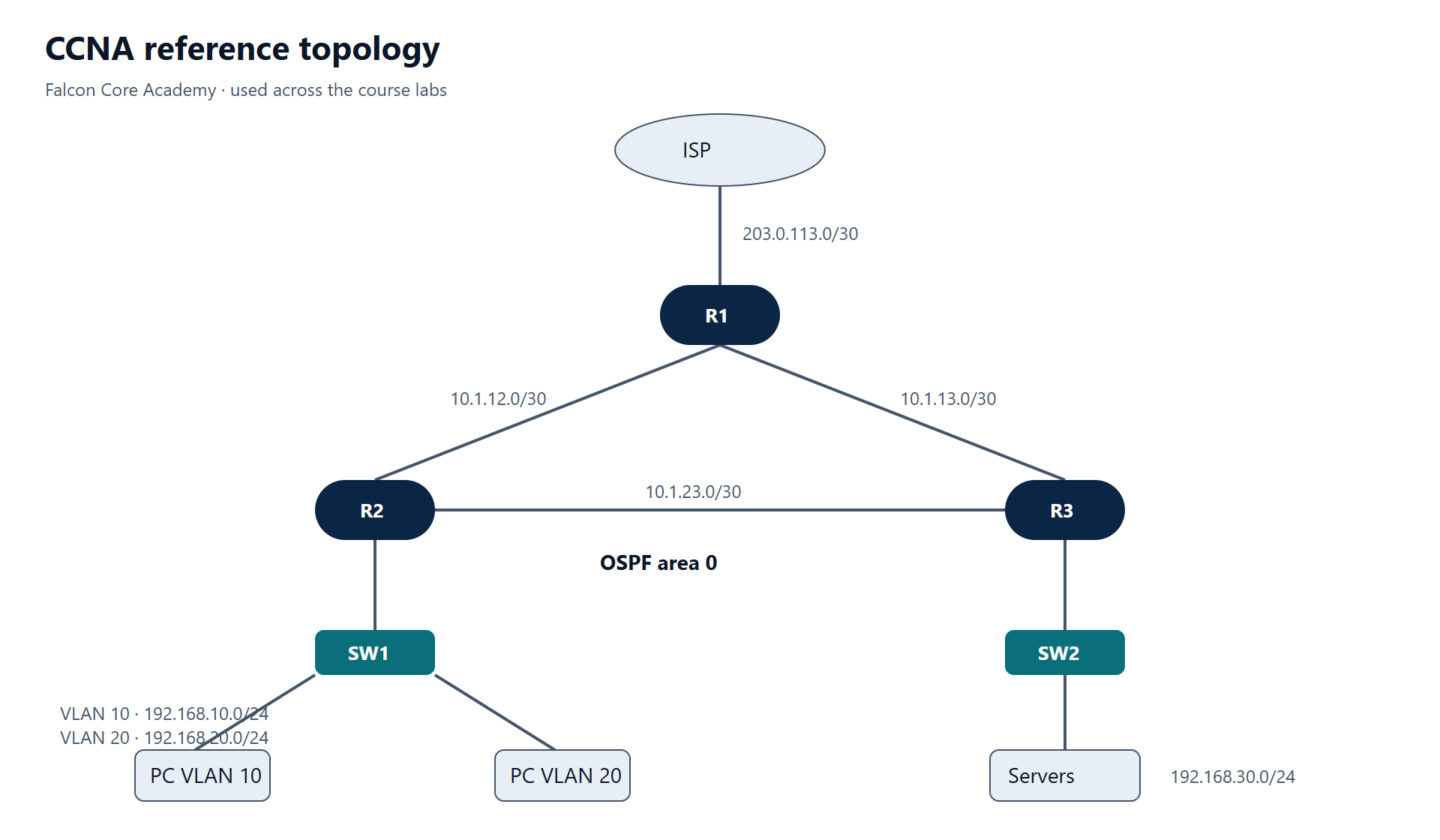
- LabCCNA lab 3: Inter-VLAN routingRoute between VLAN 10 and VLAN 20 first with router-on-a-stick, then with SVIs on a Layer 3 switch.
- LabCCNA lab 4: Spanning Tree root and edge protectionFind the root bridge STP elected on its own, move it to the switch you choose, predict port roles, and protect edge ports with PortFast and BPDU Guard.
- LabCCNA lab 5: LACP EtherChannelBundle two links between SW1 and SW2 with LACP, run the trunk over the port-channel, and diagnose a suspended member.
- LabCCNA lab 6: Static, default and floating static routesRoute between three LANs with static routes, add a default route to the ISP, and build a backup path with a floating static route.
- LabCCNA lab 7: Single-area OSPFv2Replace static routes with OSPF area 0 — router IDs, passive interfaces, point-to-point links, cost tuning, default route origination and a neighbour fault to fix.
- LabCCNA lab 8: DHCP, DHCP relay and PATMake R1 the DHCP server for staff, relay guest requests to a server, translate all inside traffic with PAT and publish a web server with static NAT.
- LabCCNA lab 9: Standard and extended ACLsRestrict SSH management to the staff VLAN, keep guests away from internal networks while allowing web and DNS, and read ACL hit counters.
- LabCCNA lab 10: Port security, DHCP snooping and DAILock access ports to known devices, stop a rogue DHCP server, and block ARP spoofing on an access switch.
- LabCCNA lab 11: IPv6 dual stack and static routingAdd IPv6 to the three-router topology, use simple link-local addresses, route with static IPv6 routes and let hosts autoconfigure with SLAAC.
- LabCCNA lab 12: Design a VLSM addressing planSize every subnet for a two-site company with room to grow, find out whether the /22 you were given is enough, and build a plan without overlaps.
Troubleshooting
- Troubleshooting guideDHCP clients get 169.254.x.x instead of an addressFind where DHCP breaks — the client VLAN, the relay, the server pool, or switch security features — using the four DORA messages as a map.
- Troubleshooting guideInside hosts cannot reach the internet through NAT/PATA checklist for NAT overload problems — inside/outside roles, the ACL that selects traffic, routing, and how to read the translation table.
- Troubleshooting guideOSPF neighbours will not reach FULLDiagnose OSPFv2 adjacency problems by state — what each stuck state means and which parameter mismatch causes it.
- Troubleshooting guideCannot SSH to a Cisco switch or routerSeparate reachability, SSH service, VTY configuration and access lists to find why SSH management fails.
- Troubleshooting guideHosts in the same VLAN cannot reach each other across switchesA layer-by-layer method for finding why a VLAN stops at the trunk — missing VLANs, pruned allowed lists, mode mismatches and native VLAN problems.
Practice questions
Original questions written by Falcon Core to check understanding. They are not taken from any certification exam.
QUESTION 1
A switch receives a frame whose destination MAC address is not in its MAC address table. What does it do?
- A. Drops the frame
- B. Floods it out every port in the same VLAN except the one it arrived on
- C. Sends it to the default gateway
- D. Sends an ARP request for the destination
Show answer
Answer: B
Unknown unicast frames are flooded within the VLAN. When the destination replies, the switch learns its MAC address from the source field and forwards later frames out one port only. Switches do not use ARP to forward frames; ARP maps IP addresses to MAC addresses for hosts and routers.
QUESTION 2
Which two statements about UDP are true? (Choose two.)
- A. It retransmits lost segments
- B. It has a smaller header than TCP
- C. It is used by DNS queries and VoIP media
- D. It uses a three-way handshake
- E. It guarantees in-order delivery
Show answer
Answer: B, C
UDP has an 8-byte header, no handshake and no retransmission — the application handles loss if it needs to. That suits short request/response exchanges (DNS) and real-time media (VoIP), where a late packet is worse than a lost one.
QUESTION 3
A device forwards traffic based on destination IP addresses and separates broadcast domains. At which OSI layer does it mainly work?
- A. Layer 1
- B. Layer 2
- C. Layer 3
- D. Layer 4
Show answer
Answer: C
Forwarding by IP address is a Layer 3 (network layer) function — a router or Layer 3 switch. Each router interface is its own broadcast domain.
QUESTION 4
One end of a link is set to full duplex and the other to half duplex. Which symptom is most likely?
- A. The link stays down
- B. Late collisions and slow throughput on the half-duplex side
- C. CRC errors on both sides and a spanning-tree loop
- D. The link works normally
Show answer
Answer: B
The link comes up, but the half-duplex side sees late collisions because the full-duplex side transmits whenever it likes. Throughput drops badly under load. Fix by letting both ends auto-negotiate, or setting both the same.
QUESTION 5
Which pair lists the default ports for SSH and HTTPS?
- A. TCP 22 and TCP 443
- B. TCP 23 and TCP 443
- C. UDP 22 and TCP 80
- D. TCP 21 and TCP 8443
Show answer
Answer: A
SSH uses TCP 22, HTTPS uses TCP 443. Telnet is TCP 23, FTP control is TCP 21, HTTP is TCP 80.
QUESTION 6
What is the main role of a type 1 hypervisor?
- A. Run virtual machines on top of a desktop operating system
- B. Run directly on server hardware and share it between virtual machines
- C. Package an application with its libraries without a guest OS
- D. Route traffic between containers
Show answer
Answer: B
A type 1 (bare-metal) hypervisor runs on the hardware and allocates CPU, memory and network to virtual machines. A type 2 hypervisor runs as an application on a host OS. Containers share the host kernel and do not need a hypervisor.
QUESTION 7
How many usable host addresses does a /27 subnet provide?
- A. 14
- B. 30
- C. 32
- D. 62
Show answer
Answer: B
A /27 leaves 5 host bits: 2^5 = 32 addresses, minus the network and broadcast addresses = 30 usable.
QUESTION 8
A host has the address 172.16.45.200/26. What is its network address?
- A. 172.16.45.128
- B. 172.16.45.192
- C. 172.16.45.0
- D. 172.16.45.196
Show answer
Answer: B
/26 means blocks of 64 in the last octet: 0, 64, 128, 192. 200 falls in the block starting at 192, so the network is 172.16.45.192/26 and the broadcast is 172.16.45.255.
QUESTION 9
A VLAN needs 100 usable addresses. Which prefix is the smallest that fits?
- A. /24
- B. /25
- C. /26
- D. /27
Show answer
Answer: B
/26 gives 62 usable — too few. /25 gives 126 usable, the smallest that fits 100.
QUESTION 10
Which address is a private (RFC 1918) address?
- A. 172.32.10.5
- B. 192.169.1.1
- C. 172.20.0.1
- D. 11.0.0.1
Show answer
Answer: C
The private ranges are 10.0.0.0/8, 172.16.0.0/12 (172.16.0.0–172.31.255.255) and 192.168.0.0/16. 172.32.x.x and 192.169.x.x are public.
QUESTION 11
A PC can ping hosts in its own subnet but nothing outside it. Its address and mask are correct. What is the most likely cause?
- A. Wrong or missing default gateway
- B. Duplex mismatch
- C. Wrong DNS server
- D. The switch port is in the wrong VLAN
Show answer
Answer: A
Reaching local hosts proves the address, mask, VLAN and cabling are fine. Traffic to other subnets goes to the default gateway, so a wrong gateway breaks exactly that. A wrong DNS server would break names, not pings to IP addresses.
QUESTION 12
What is the correct short form of 2001:0db8:0000:0000:0a00:0000:0000:0001?
- A. 2001:db8::a00::1
- B. 2001:db8::a00:0:0:1
- C. 2001:db8:0:0:a::1
- D. 2001:db8::a:0:0:1
Show answer
Answer: B
Leading zeros in each group can be dropped (0a00 → a00, but not trailing zeros).
::may replace one run of zero groups only. Both runs here are two groups long; replacing the first gives 2001:db8::a00:0:0:1. Using::twice is invalid.QUESTION 13
Which prefix identifies an IPv6 link-local unicast address?
- A. 2000::/3
- B. FC00::/7
- C. FE80::/10
- D. FF00::/8
Show answer
Answer: C
FE80::/10 is link-local, used for neighbour discovery and as the next hop in routing. 2000::/3 is global unicast, FC00::/7 is unique local and FF00::/8 is multicast.
QUESTION 14
Which two steps does modified EUI-64 use to build a 64-bit interface ID from a MAC address? (Choose two.)
- A. Insert FFFE in the middle of the MAC address
- B. Append the MAC address twice
- C. Flip the seventh bit of the first byte
- D. Replace the first byte with FE80
Show answer
Answer: A, C
The 48-bit MAC is split in half, FFFE is inserted in the middle to make 64 bits, and the seventh bit (universal/local) is flipped. For example 00:50:79:66:68:00 becomes 0250:79ff:fe66:6800.
QUESTION 15
A host configures itself with SLAAC. Which address does it use as its default gateway?
- A. The router's global unicast address
- B. The router's link-local address from the Router Advertisement
- C. FF02::2
- D. The first address in the /64 prefix
Show answer
Answer: B
Router Advertisements are sent from the router's link-local address, and hosts use that as their default gateway. FF02::2 is the all-routers multicast group, used by hosts to ask for an RA.
QUESTION 16
On an 802.1Q trunk, what happens to frames in the native VLAN?
- A. They are sent with a tag of 0
- B. They are sent untagged
- C. They are dropped
- D. They are encapsulated with ISL
Show answer
Answer: B
Native VLAN frames cross the trunk untagged, and untagged frames received on a trunk are placed in the native VLAN. Both ends must agree, and good practice is an unused VLAN as native.
QUESTION 17
Two switches are connected; both ports are left in "switchport mode dynamic auto". What is the result?
- A. A trunk forms
- B. The link becomes an access link
- C. The link is err-disabled
- D. The link uses ISL trunking
Show answer
Answer: B
Dynamic auto only responds to DTP; it never starts negotiation. With both sides waiting, the link stays an access link. Configure trunks statically with
switchport mode trunk.QUESTION 18
Three switches have these bridge IDs for VLAN 10: SW1 32778 / 0011.1111.1111, SW2 24586 / 00aa.aaaa.aaaa, SW3 32778 / 0001.0101.0101. Which switch becomes root?
- A. SW1
- B. SW2
- C. SW3
- D. None — the priorities must be equal
Show answer
Answer: B
The lowest bridge ID wins, and priority is compared first. SW2 has the lowest priority (24586 = 24576 + VLAN 10), so it is root regardless of MAC address. MAC addresses only break ties.
QUESTION 19
BPDU Guard is enabled on an access port and a BPDU arrives on it. What happens?
- A. The BPDU is dropped and the port keeps forwarding
- B. The port becomes a root port
- C. The port is put in the err-disabled state
- D. The port moves to blocking until the BPDU stops
Show answer
Answer: C
BPDU Guard err-disables the port, because a BPDU on an edge port means a switch was connected where only end devices belong. Recover with
shutdown/no shutdownor errdisable recovery.QUESTION 20
Which combination of modes forms an LACP EtherChannel?
- A. passive and passive
- B. active and passive
- C. desirable and active
- D. on and active
Show answer
Answer: B
LACP needs at least one side active: active/active or active/passive. Passive/passive never starts. Desirable is a PAgP mode, and "on" sends no negotiation at all, so it does not combine with LACP.
QUESTION 21
Which field of an incoming frame does a switch use to populate its MAC address table?
- A. Destination MAC address
- B. Source MAC address
- C. Source IP address
- D. EtherType
Show answer
Answer: B
The switch records the source MAC address with the incoming port and VLAN. It uses the destination MAC to decide where to forward.
QUESTION 22
In most regions, which set of 2.4 GHz channels do not overlap?
- A. 1, 5, 9
- B. 1, 6, 11
- C. 2, 7, 12
- D. 3, 8, 13
Show answer
Answer: B
With 20 MHz channels spaced 5 MHz apart, 1, 6 and 11 are the usual non-overlapping set. The 5 GHz band offers many more non-overlapping channels.
QUESTION 23
What is CAPWAP used for in a controller-based wireless network?
- A. Encrypting traffic between clients and the AP
- B. Tunnelling control and data traffic between lightweight APs and the WLC
- C. Assigning channels between neighbouring autonomous APs
- D. Authenticating users against RADIUS
Show answer
Answer: B
CAPWAP carries a control tunnel (and, in local mode, a data tunnel) between each lightweight AP and the wireless LAN controller. Client encryption is WPA2/WPA3; user authentication is 802.1X with RADIUS.
QUESTION 24
Which method does WPA3-Personal use instead of the WPA2 pre-shared key handshake?
- A. TKIP
- B. SAE (Simultaneous Authentication of Equals)
- C. WEP
- D. EAP-TLS
Show answer
Answer: B
WPA3-Personal uses SAE, which resists offline dictionary attacks against captured handshakes. TKIP and WEP are obsolete; EAP-TLS is an 802.1X (Enterprise) method.
QUESTION 25
A lightweight AP in local mode serves three WLANs. How is its switch port usually configured?
- A. As a trunk carrying all three WLAN VLANs
- B. As an access port in the AP management VLAN
- C. As a routed port
- D. As an EtherChannel member
Show answer
Answer: B
In local mode, client traffic is tunnelled to the WLC inside CAPWAP, so the AP only needs an access port in its management VLAN. Autonomous APs and FlexConnect APs that switch traffic locally use trunks.
QUESTION 26
A router has routes to 10.0.0.0/8, 10.1.0.0/16 and 10.1.1.0/24. Which route is used for a packet to 10.1.1.70?
- A. 10.0.0.0/8
- B. 10.1.0.0/16
- C. 10.1.1.0/24
- D. The one with the lowest administrative distance
Show answer
Answer: C
The router always uses the longest matching prefix first. All three match, and /24 is the most specific. Administrative distance only decides between routes to the same prefix from different sources.
QUESTION 27
A router learns 192.168.5.0/24 through OSPF and has a static route to the same prefix with default settings. Which goes in the routing table?
- A. The OSPF route, because it is dynamic
- B. The static route, because AD 1 is lower than 110
- C. Both, load-balanced
- D. Whichever was learned first
Show answer
Answer: B
Static routes have an administrative distance of 1; OSPF has 110. Lower AD wins. A floating static route raises its AD above 110 so that OSPF is preferred and the static only takes over on failure.
QUESTION 28
Which command creates a backup default route that is used only when an OSPF-learned default route (AD 110) disappears?
- A. ip route 0.0.0.0 0.0.0.0 10.0.0.1
- B. ip route 0.0.0.0 0.0.0.0 10.0.0.1 1
- C. ip route 0.0.0.0 0.0.0.0 10.0.0.1 120
- D. ip route 0.0.0.0 255.255.255.255 10.0.0.1 120
Show answer
Answer: C
A distance above 110 keeps the static route out of the table while OSPF provides the default. The mask for a default route is 0.0.0.0, not 255.255.255.255.
QUESTION 29
On a shared Ethernet segment, which router becomes the OSPF DR if all priorities are left at default?
- A. The router with the highest router ID
- B. The router with the lowest router ID
- C. The first router to boot, always
- D. The router with the most interfaces
Show answer
Answer: A
With equal priority (default 1), the highest router ID wins. Note the election is not pre-emptive: a router that joins later does not take over the DR role, even with a higher ID.
QUESTION 30
With the default reference bandwidth of 100 Mbps, what OSPF cost do a FastEthernet and a GigabitEthernet interface get?
- A. 1 and 1
- B. 10 and 1
- C. 100 and 10
- D. 1 and 0.1
Show answer
Answer: A
Cost = reference ÷ interface bandwidth, with a minimum of 1. 100/100 = 1 and 100/1000 = 0.1 → rounded up to 1. OSPF cannot tell the two apart, which is why the reference bandwidth should be raised on modern networks.
QUESTION 31
What problem does HSRP solve?
- A. Loops between switches
- B. Hosts losing their gateway when the router they point to fails
- C. Slow OSPF convergence
- D. Duplicate IP addresses from DHCP
Show answer
Answer: B
Hosts have a single default gateway address. HSRP gives two routers a shared virtual IP and virtual MAC; if the active router fails, the standby takes over the same gateway address without any change on the hosts.
QUESTION 32
How does PAT allow many inside hosts to share one public IPv4 address?
- A. By giving each host a different public address from a pool
- B. By tracking each session with a unique source port number
- C. By encrypting each session
- D. By using IPv6 internally
Show answer
Answer: B
PAT (NAT overload) maps each inside address and port to the same public address with a unique port, and uses that port to send replies back to the right host.
QUESTION 33
Clients in VLAN 30 need addresses from a DHCP server in another subnet. Where is ip helper-address configured?
- A. On the DHCP server
- B. On the client's access switch port
- C. On the router interface that is the default gateway for VLAN 30
- D. On the router interface facing the DHCP server
Show answer
Answer: C
The relay must receive the client's broadcast, so it goes on the gateway interface (or SVI) for the client VLAN. The router then unicasts the request to the server with its own interface address as giaddr.
QUESTION 34
A router synchronises to an NTP server that reports stratum 2. What stratum does the router report?
- A. 1
- B. 2
- C. 3
- D. 16
Show answer
Answer: C
Each hop away from the reference clock adds one: syncing to a stratum 2 server makes the router stratum 3. Stratum 16 means unsynchronised.
QUESTION 35
Which syslog severity level is more severe than "warning" (level 4)?
- A. informational (6)
- B. notification (5)
- C. error (3)
- D. debugging (7)
Show answer
Answer: C
Lower numbers are more severe: 0 emergency, 1 alert, 2 critical, 3 error, 4 warning, 5 notification, 6 informational, 7 debugging.
logging trap warningssends levels 0–4.QUESTION 36
Which QoS tool is usually used to give voice traffic strict priority on a congested WAN link?
- A. Policing
- B. Low Latency Queuing (a priority queue)
- C. Weighted RED
- D. Shaping
Show answer
Answer: B
LLQ serves a strict-priority queue first, keeping voice delay and jitter low. It is limited to a configured bandwidth so voice cannot starve other classes. Policing and shaping limit rates; WRED drops early to avoid TCP synchronisation.
QUESTION 37
Which SNMP version supports authentication and encryption of messages?
- A. SNMPv1
- B. SNMPv2c
- C. SNMPv3
- D. All versions with a community string
Show answer
Answer: C
SNMPv3 adds user-based authentication and privacy (encryption) through the authPriv level. v1 and v2c send community strings in clear text.
QUESTION 38
Where should an extended ACL usually be applied?
- A. As close to the destination as possible
- B. As close to the source as possible
- C. Only on the outside interface
- D. On the VTY lines
Show answer
Answer: B
Extended ACLs can match source, destination and port precisely, so place them close to the source to drop unwanted traffic early. Standard ACLs match only the source, so they are placed close to the destination to avoid blocking more than intended.
QUESTION 39
An ACL contains only: deny ip host 10.1.1.5 any. It is applied inbound on the LAN interface. What happens to traffic from 10.1.1.6?
- A. It is permitted
- B. It is denied by the implicit deny at the end
- C. It is permitted only if it matches a route
- D. It is logged and permitted
Show answer
Answer: B
Every ACL ends with an invisible deny any. With no permit statement, all traffic is dropped — the host 10.1.1.6 too. Add
permit ip any anyafter the deny if the intent was to block one host only.QUESTION 40
Which wildcard mask matches all hosts in 10.10.16.0/20?
- A. 0.0.15.255
- B. 0.0.16.255
- C. 255.255.240.0
- D. 0.0.31.255
Show answer
Answer: A
The wildcard is the inverse of the subnet mask: 255.255.255.255 − 255.255.240.0 = 0.0.15.255.
QUESTION 41
Which port security violation mode drops frames from unknown MACs, increments the counter and sends a syslog message, but keeps the port up?
- A. protect
- B. restrict
- C. shutdown
- D. shutdown vlan
Show answer
Answer: B
restrict drops and logs. protect drops silently without counting. shutdown (the default) err-disables the port.
QUESTION 42
Which attack does DHCP snooping mainly prevent?
- A. MAC flooding
- B. A rogue DHCP server handing out a false gateway
- C. VLAN hopping by double tagging
- D. Brute-force SSH logins
Show answer
Answer: B
DHCP snooping drops server messages (Offer, Ack) on untrusted ports, so a rogue server cannot send clients a malicious gateway or DNS server. Its binding table is also used by DAI and IP Source Guard.
QUESTION 43
Which AAA function records which commands an administrator entered?
- A. Authentication
- B. Authorisation
- C. Accounting
- D. Auditing
Show answer
Answer: C
Accounting records what users did. Authentication checks who they are; authorisation decides what they may do. TACACS+ supports per-command authorisation and accounting, which is why it is common for device administration.
QUESTION 44
Building the routing table with OSPF is a function of which plane?
- A. Data plane
- B. Control plane
- C. Management plane
- D. Application plane
Show answer
Answer: B
The control plane decides how traffic should be forwarded (routing protocols, STP, ARP). The data plane forwards packets using those decisions. The management plane is how administrators access the device (SSH, SNMP, APIs).
QUESTION 45
Which HTTP method is normally used in a REST API to read a resource without changing it?
- A. POST
- B. GET
- C. PUT
- D. DELETE
Show answer
Answer: B
GET reads. POST creates, PUT replaces (or creates), PATCH modifies part of a resource and DELETE removes it — roughly the CRUD operations.
QUESTION 46
Which line is valid JSON?
- A. {name: 'R1', interfaces: 4}
- B. {"name": "R1", "interfaces": 4}
- C. {"name": "R1", "interfaces": 4,}
- D. ["name" = "R1"]
Show answer
Answer: B
JSON keys and strings need double quotes, key/value pairs use a colon, and trailing commas are not allowed.
QUESTION 47
Which configuration management tool is agentless and connects to network devices over SSH by default?
- A. Puppet
- B. Chef
- C. Ansible
- D. SNMP
Show answer
Answer: C
Ansible pushes changes over SSH (or APIs) with no agent on the device, using YAML playbooks. Puppet and Chef traditionally use agents that pull configuration from a server.
QUESTION 48
In a controller-based network, what does a northbound API connect the controller to?
- A. The network devices it manages
- B. Applications and scripts that use the controller
- C. Other controllers in a cluster only
- D. The power supply of the devices
Show answer
Answer: B
Northbound APIs (often REST) let applications and administrators talk to the controller. Southbound interfaces (NETCONF, RESTCONF, OpenFlow, CLI/SSH) connect the controller to the devices.
Interview questions
A user types a website address and presses Enter. Walk me through what happens on the network.
A strong answer goes layer by layer:
- DNS — the PC checks its cache, then asks its DNS server (UDP 53) for the name.
- Local or remote? — it compares the server's IP with its own address and mask; the server is remote, so frames go to the default gateway.
- ARP — if it does not know the gateway's MAC, it broadcasts an ARP request.
- TCP handshake to port 443, then the TLS handshake.
- Switches forward by MAC address; routers by IP, rewriting the Layer 2 header at every hop. At the edge, PAT changes the source address and port.
- The HTTP request and response travel inside the TLS session.
Bonus points for mentioning where each piece can fail and how you would check it.
What is the difference between a switch and a router?
- A switch forwards frames inside a LAN by MAC address, learns addresses from source MACs, and floods unknown or broadcast frames within the VLAN. One switch = one broadcast domain per VLAN.
- A router forwards packets between networks by IP address using its routing table, separates broadcast domains and can apply NAT, ACLs and QoS.
- A Layer 3 switch does both — hardware switching plus routing between VLANs with SVIs.
Why would you use VLANs in an office network?
- Security / segmentation — guests, staff, voice, cameras and servers are kept apart, and traffic between them goes through a router or firewall where it can be filtered.
- Smaller broadcast domains — less broadcast traffic and smaller failure domains.
- Flexibility — a user moves desk without re-cabling; the port is assigned to their VLAN.
- QoS — voice VLANs make it easy to prioritise phone traffic.
Users in VLAN 20 on one floor cannot reach the server in VLAN 20 on another floor. VLAN 10 works fine. How do you troubleshoot it?
Since VLAN 10 works, the physical link and trunk are up. Focus on what is specific to VLAN 20:
show vlan briefon every switch in the path — does VLAN 20 exist?show interfaces trunk— is VLAN 20 in the allowed list and in the forwarding list on each trunk?show spanning-tree vlan 20— is it blocked somewhere without an alternative path?show mac address-table vlan 20— are the MACs learned on the expected ports?- Check the hosts' addresses are in the VLAN 20 subnet.
What does spanning tree do, and what happens without it?
STP prevents Layer 2 loops in a network with redundant links by electing a root bridge and blocking ports that would create a loop, while keeping them ready as backups.
Without it, a loop causes a broadcast storm (frames have no TTL and circulate forever), MAC table instability (the same MAC is learned on different ports) and duplicate frames. The network can become unusable within seconds.
Mention Rapid PVST+ for fast convergence, setting the root deliberately, and PortFast with BPDU Guard on edge ports.
When would you use static routes and when a dynamic protocol like OSPF?
- Static — small or stub networks, a default route to the ISP, or a backup (floating) route. Simple, no overhead, predictable, but no automatic failover unless combined with tracking or floating routes, and hard to maintain at scale.
- OSPF — many routers or redundant paths. It adapts to failures automatically, scales with areas and is an open standard.
- Real networks often mix both: OSPF inside, a static default at the edge redistributed with
default-information originate.
Two OSPF routers are stuck in EXSTART. What would you check?
EXSTART/EXCHANGE usually means the routers agree on hello parameters but fail to exchange database descriptions. Main causes:
- MTU mismatch — compare
show interfaces/ip mtuon both ends; fix the MTU (ip ospf mtu-ignoreonly as a workaround). - Duplicate router IDs.
Use show ip ospf neighbor and, in a lab, debug ip ospf adj to confirm.
What is administrative distance and how is it different from a metric?
- Administrative distance ranks route sources when the same prefix is learned from more than one — connected 0, static 1, eBGP 20, EIGRP 90, OSPF 110, RIP 120. Lower wins.
- The metric chooses between paths within one protocol — OSPF cost, EIGRP composite metric, RIP hop count.
- Both only matter for identical prefixes: longest prefix match is checked first.
Explain static NAT, dynamic NAT and PAT, and when you use each.
- Static NAT — permanent one-to-one mapping. Used to publish a server (or a single port with port forwarding).
- Dynamic NAT — inside hosts take addresses from a pool, one-to-one while the session lasts. Rare today because public IPv4 addresses are scarce.
- PAT (overload) — many hosts share one public address, distinguished by port number. The normal choice for internet access.
Know the commands: ip nat inside/outside, an ACL to select traffic, ip nat inside source list … interface … overload, and show ip nat translations.
Describe how a client gets an address with DHCP and what changes when the server is on another subnet.
DORA: Discover (broadcast), Offer, Request (broadcast, so other servers know), Ack.
Routers do not forward broadcasts, so for a remote server the client's gateway interface needs ip helper-address <server>. The router forwards the request as unicast and puts its interface address in giaddr, which the server uses to choose the right pool.
A department needs 50 hosts. Which prefix do you give it, and what is the usable range if the network is 10.20.30.64?
/26 = 62 usable hosts — the smallest that fits 50 (a /27 gives only 30).
10.20.30.64/26: network .64, usable .65 – .126, broadcast .127, mask 255.255.255.192.
A good candidate also mentions leaving room for growth.
Why move to IPv6, and how do the address types differ from IPv4?
- Why — IPv4 exhaustion; IPv6 removes the need for NAT for addressing, simplifies headers and supports autoconfiguration (SLAAC).
- Address types — global unicast (2000::/3), link-local (FE80::/10, on every interface, used for neighbour discovery and as routing next hop), unique local (FC00::/7), multicast (FF00::/8). No broadcast — multicast replaces it.
- ARP is replaced by Neighbour Discovery (ICMPv6).
- Dual stack is the most common migration approach.
What is the difference between standard and extended ACLs, and where do you apply each?
- Standard — match the source address only. Apply close to the destination so you do not block the source from everything else.
- Extended — match protocol, source, destination and ports. Apply close to the source so unwanted traffic is dropped early.
- Both are processed top-down, first match wins, with an implicit deny any at the end. Named ACLs can be edited by sequence number.
Which Layer 2 attacks do you protect an access switch against, and how?
- MAC flooding → port security (limit MACs per port).
- Rogue DHCP server → DHCP snooping (trust only uplinks).
- ARP spoofing / man-in-the-middle → Dynamic ARP Inspection, using the snooping binding table.
- VLAN hopping → disable DTP (
nonegotiate), static access ports, unused native VLAN, unused ports shut down in a parking VLAN. - STP manipulation / rogue switches → BPDU Guard on edge ports, Root Guard where the root must not change.
How do you secure management access to a Cisco device?
- SSH v2 only (
transport input ssh), RSA key of at least 2048 bits; never Telnet — it sends credentials in clear text. - Hashed secrets (
enable secret,username … secret), not passwords. - Restrict VTY access by source with an access-class.
- AAA with TACACS+ or RADIUS and a local fallback, so each admin has their own account and actions are logged.
- Exec timeouts, login banner, disable unused services such as the HTTP server, NTP for accurate logs and syslog to a server.
How does HSRP work?
Two (or more) routers share a virtual IP and virtual MAC that hosts use as their gateway. One router is active and forwards traffic; the standby listens for hellos. If the active stops sending hellos for the hold time, the standby takes over the same virtual address — hosts change nothing.
Priority (default 100) decides the active router; preempt lets a higher-priority router take back the role. Interface tracking can lower priority when an uplink fails. VRRP and GLBP are alternatives; GLBP also load-balances.
Why use EtherChannel instead of just connecting more cables between switches?
Without EtherChannel, STP blocks every extra link, so you get redundancy but no extra bandwidth. EtherChannel bundles the links into one logical interface: STP sees one link, traffic is load-balanced across members by a hash, and a member failure only reduces bandwidth.
Use LACP (active/passive) for standards-based negotiation. Members must match speed, duplex, VLAN and trunk settings.
What would you check when users complain about slow Wi-Fi in one area?
- Signal and coverage — RSSI and SNR at the location; distance or walls between the client and AP.
- Interference / channels — co-channel interference on 2.4 GHz; are channels 1, 6, 11 used? Move capable clients to 5 GHz.
- Client load — too many clients on one AP.
- Data rates — very low minimum data rates let slow clients use airtime.
- Wired side — the AP's uplink speed, duplex and errors.
- Use the WLC dashboard to see client health and RF reports.
Describe your general troubleshooting method.
- Define the problem — who is affected, what exactly fails, since when, what changed.
- Gather facts — ping, traceroute,
showcommands, logs. - Choose a method — bottom-up (physical first), top-down, divide-and-conquer (start at the layer the evidence points to), or follow the path.
- Test one change at a time and verify.
- Document the cause and the fix, and update monitoring if the problem was not detected automatically.
How does traceroute work, and what does a line of asterisks mean?
Traceroute sends probes with TTL 1, 2, 3 …. Each router that decrements the TTL to zero replies with ICMP Time Exceeded, which reveals its address and the round-trip time.
* * * means no reply for that hop. It can be a router that does not send ICMP or rate-limits it (normal if later hops respond), or the point where traffic is dropped (if every following hop is also *).
Windows tracert uses ICMP echo; Cisco and Linux traceroute use UDP by default.
Why does voice traffic need QoS, and what tools would you use?
Voice needs low delay (< ~150 ms one way), low jitter and minimal loss; it does not recover lost packets.
- Classification and marking — trust or set DSCP EF (46) at the edge, near the phone.
- Queuing — LLQ: a strict-priority queue for voice, with a bandwidth limit, plus CBWFQ for other classes.
- Shaping on links where the provider polices, to avoid drops.
- QoS only matters when there is congestion — it decides who waits, it does not add bandwidth.
What does a controller-based (SDN) network change compared with a traditional one?
- The control plane is centralised (logically) in a controller; devices keep the data plane.
- Configuration is defined once as intent or policy, and the controller pushes it to devices through southbound interfaces (NETCONF, RESTCONF, APIs).
- Northbound REST APIs let scripts and other systems automate the network.
- Benefits: consistency, faster changes, network-wide visibility. Risks: the controller becomes critical and needs redundancy.
- Examples: Cisco Catalyst Center, SD-Access, SD-WAN.
Read this JSON and tell me the IP address of the second interface — {"interfaces":[{"name":"Gi0/0","ip":"10.0.0.1"},{"name":"Gi0/1","ip":"10.0.1.1"}]}
interfaces is a list of objects. Lists are zero-indexed, so the second element is interfaces[1], and its ip key is 10.0.1.1.
In Python: data["interfaces"][1]["ip"] after data = json.loads(text). Candidates should know objects (key/value), arrays (ordered lists), strings, numbers, booleans and null.
You need to change the configuration of a core switch during the day. How do you do it safely?
- Follow change management — approval, a maintenance window if possible, and stakeholders informed.
- Back up the running configuration first.
- Prepare and peer-review the exact commands, plus a rollback plan (for example
reload in 10orconfigure replace/ archive rollback, so a mistake that cuts access undoes itself). - Test in a lab when possible.
- Apply, verify with pre-agreed checks, save the configuration, cancel any scheduled reload, and document.
How do you keep your networking skills up to date?
There is no single right answer. Good answers are specific: a lab environment (Packet Tracer, GNS3, EVE-NG, containerlab), a certification plan with dates, vendor release notes and official documentation, community forums, automating a real task at work, and writing up what they learned. Interviewers look for habits and evidence, not a list of buzzwords.
Downloads
- TemplateCisco access switch baseline configurationA commented starting configuration for a Catalyst access switch — secure management, VLANs, trunk uplink, edge-port protection and DHCP snooping. Replace every value in angle brackets.
- TemplateCisco branch edge router configurationA commented template for a small-site router — router-on-a-stick VLANs, DHCP, PAT to the internet, a guest ACL and hardened management. Replace every value in angle brackets.
Certification details change. Last checked 2026-10-07; see the official source.