// Lesson 21 of 49 · Switching and VLANs
Spanning Tree Protocol
Redundant links between switches protect against failures — but Ethernet frames have no time-to-live. Without protection, a broadcast entering a loop circulates forever, multiplying until the network collapses (a broadcast storm), and MAC tables flap constantly.
Spanning Tree Protocol (STP, IEEE 802.1D) prevents this by logically blocking just enough ports to leave a single loop-free path, and unblocking them if the active path fails.
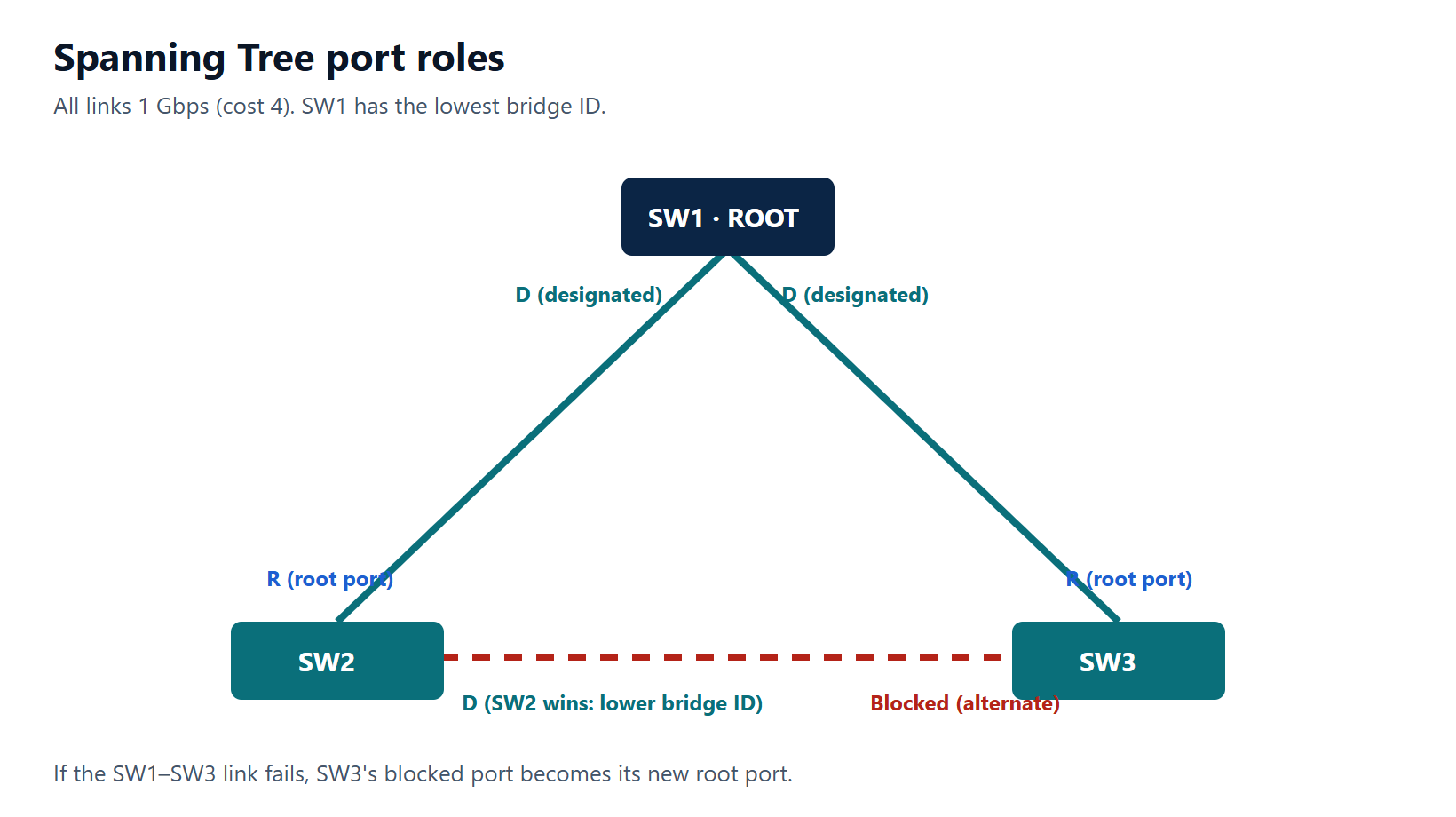
Step 1: elect the root bridge
Switches exchange BPDUs. Each switch has a bridge ID = priority (default 32768, plus the VLAN number with PVST+) + MAC address.
The lowest bridge ID wins. Lowest priority first; if equal, lowest MAC.
Never leave this to chance — the oldest switch (often with the lowest MAC) would win by default. Choose the root:
SW1(config)# spanning-tree vlan 10,20 root primary      ! sets priority 24576 (or lower if needed)
SW2(config)# spanning-tree vlan 10,20 root secondary    ! sets 28672
! or explicitly, in multiples of 4096:
SW1(config)# spanning-tree vlan 10,20 priority 4096
Step 2: each non-root switch picks one root port
The root port is the port with the lowest cost path to the root. Default port costs (short method):
| Speed | Cost |
|---|---|
| 10 Mbps | 100 |
| 100 Mbps | 19 |
| 1 Gbps | 4 |
| 10 Gbps | 2 |
Tie-breakers, in order: lowest neighbour bridge ID → lowest neighbour port priority → lowest neighbour port number.
Step 3: each segment gets one designated port
On every link, the port with the lowest cost to the root becomes the designated port (it forwards onto that segment). All ports on the root bridge are designated.
Step 4: everything else blocks
Ports that are neither root nor designated are blocking (802.1D) — or alternate/backup in RSTP. They still listen to BPDUs so they can take over.
Port states (802.1D)
| State | Forwards data | Learns MACs | Notes |
|---|---|---|---|
| Blocking | No | No | Receives BPDUs |
| Listening | No | No | 15 s (forward delay) |
| Learning | No | Yes | 15 s |
| Forwarding | Yes | Yes | |
| Disabled | No | No | Administratively down |
Classic STP can take 30–50 seconds to converge — which is why RSTP exists.
RSTP and Rapid PVST+
Rapid STP (802.1w) converges in about a second using a handshake between neighbours instead of timers. Port roles: root, designated, alternate (backup path to the root), backup (backup to a shared segment). States collapse to discarding, learning, forwarding.
Cisco's Rapid PVST+ runs one RSTP instance per VLAN — usually the right choice:
SW1(config)# spanning-tree mode rapid-pvst
MSTP (802.1s) maps many VLANs to a few instances, for large networks.
Protecting edge ports
- PortFast — access ports to end devices go straight to forwarding (no 30-second wait, no DHCP timeouts at boot).
- BPDU Guard — if a BPDU ever arrives on a PortFast port (someone plugged in a switch), the port is shut down (err-disabled).
SW1(config)# interface range GigabitEthernet1/0/1 - 20
SW1(config-if-range)# spanning-tree portfast
SW1(config-if-range)# spanning-tree bpduguard enable
! or globally for all PortFast ports:
SW1(config)# spanning-tree portfast default
SW1(config)# spanning-tree portfast bpduguard default
Recover an err-disabled port with shutdown / no shutdown after removing the cause (or configure errdisable recovery).
Other protections you will meet later: Root Guard (stop a port from becoming the path to a new root) and Loop Guard (stop a port forwarding if BPDUs stop arriving).
Verify
SW1# show spanning-tree vlan 10
VLAN0010
  Spanning tree enabled protocol rstp
  Root ID    Priority    24586
             Address     001a.2b3c.4d00
             This bridge is the root
...
Interface           Role Sts Cost      Prio.Nbr Type
------------------- ---- --- --------- -------- -----------
Gi1/0/23            Desg FWD 4         128.23   P2p
Gi1/0/24            Desg FWD 4         128.24   P2p
Key points
- Lowest bridge ID (priority, then MAC) becomes root — set it deliberately.
- Root port = best path to root; designated port = best port per segment; the rest block.
- Use Rapid PVST+ for fast convergence.
- PortFast + BPDU Guard on every access port to end devices.
Sign in to save your lesson progress across devices. You can read every published lesson without an account.